
在应用中使用多平台资源
当你为项目设置好资源后,构建项目以生成提供资源访问权限的特殊 Res 类。要重新生成 Res 类和所有资源访问器,请再次构建项目或在 IDE 中重新导入项目。
之后,你可以在代码或外部库中使用生成的类来访问配置的多平台资源。
阅读以下内容了解详细信息:
- 导入生成的
Res类和访问器。 - 自定义访问器类生成:如何将其设为 public、分配到软件包或无条件生成。
- 处理特定的资源类型:
- 可绘制资源,例如简单图像、栅格化图像或 XML 矢量图。
- 来自 Material Symbols 库的 矢量 Android XML 图标。
- 字符串,包括简单字符串、模板、数组和复数。
- 存储和加载自定义字体。
- 原始文件以及将字节数组转换为图像。
- 访问通过字符串 ID 映射的资源。
- 将多平台资源用作 Android 资产。
- 处理 Web 特有的资源:
- 使用外部资源: 来自外部库、 远程文件以及 Java 资源。
导入生成的类
要使用准备好的资源,请导入生成的类,例如:
import project.shared.generated.resources.Res
import project.shared.generated.resources.example_image
这里:
project是你的项目名称shared是你放置资源目录的模块Res是生成的类的默认名称example_image是composeResources/drawable目录中的图像文件名(例如example_image.png)。
自定义访问器类生成
你可以使用 Gradle 设置来根据需要自定义生成的 Res 类。
在 build.gradle.kts 文件的 compose.resources {} 代码块中,你可以指定几个影响项目 Res 类生成方式的设置。 配置示例如下:
compose.resources {
    publicResClass = false
    packageOfResClass = "me.sample.library.resources"
    generateResClass = auto
}- 将
publicResClass设置为true会使生成的Res类公开。默认情况下,生成的类是 internal。 packageOfResClass允许你将生成的Res类分配给特定的软件包(以便在代码中访问,以及在最终工件中进行隔离)。默认情况下,Compose Multiplatform 为该类分配{group name}.{module name}.generated.resources软件包。- 将
generateResClass设置为always会使项目无条件生成Res类。当资源库仅通过传递方式可用时,这可能很有用。默认情况下,Compose Multiplatform 使用auto值,仅当当前项目对资源库有显式的implementation或api依赖项时才生成Res类。
资源用法
图像
你可以将可绘制资源作为简单图像、栅格化图像或 XML 矢量图访问。 除 Android 外,所有平台均支持 SVG 图像。
要将可绘制资源作为
Painter图像访问,请使用painterResource()函数:kotlin@Composable fun painterResource(resource: DrawableResource): Painter {...}painterResource()函数接收资源路径并返回Painter值。该函数在除 Web 之外的所有目标上都是同步运行的。对于 Web 目标,它在第一次重组时返回一个空的Painter,随后在重组中替换为加载的图像。painterResource()加载用于栅格化图像格式(如.png、.jpg、.bmp、.webp)的BitmapPainter,或用于 Android XML 矢量可绘制格式的VectorPainter。- XML 矢量可绘制对象的格式与 Android 相同,但不支持对 Android 资源的外部引用。
要将可绘制资源作为
ImageBitmap栅格化图像访问,请使用imageResource()函数:kotlin@Composable fun imageResource(resource: DrawableResource): ImageBitmap {...}要将可绘制资源作为
ImageVectorXML 矢量图访问,请使用vectorResource()函数:kotlin@Composable fun vectorResource(resource: DrawableResource): ImageVector {...}
以下是在 Compose Multiplatform 代码中访问图像的示例:
Image(
    painter = painterResource(Res.drawable.my_image),
    contentDescription = null
)
图标
你可以使用来自 Material Symbols 库的矢量 Android XML 图标:
打开 Google Fonts Icons 库,选择一个图标,转到 Android 选项卡,然后点击 Download。
将下载的 XML 图标文件添加到多平台资源的
drawable目录中。打开 XML 图标文件并将
android:fillColor设置为#000000。 移除任何其他用于颜色调整的 Android 特定特性,如android:tint。修改前:
xml<vector xmlns:android="http://schemas.android.com/apk/res/android" android:width="24dp" android:height="24dp" android:viewportWidth="960" android:viewportHeight="960" android:tint="?attr/colorControlNormal"> <path android:fillColor="@android:color/white" android:pathData="..."/> </vector>修改后:
xml<vector xmlns:android="http://schemas.android.com/apk/res/android" android:width="24dp" android:height="24dp" android:viewportWidth="960" android:viewportHeight="960"> <path android:fillColor="#000000" android:pathData="..."/> </vector>构建项目以生成资源访问器,或让 Kotlin Multiplatform IDE 插件自动处理。
以下是在 Compose Multiplatform 代码中访问图标并使用 colorFilter 参数调整颜色的示例:
Image(
    painter = painterResource(Res.drawable.ic_sample_icon),
    contentDescription = "Sample icon",
    modifier = Modifier.size(24.dp),
    colorFilter = ColorFilter.tint(Color.Blue)
)
字符串
将所有字符串资源存储在 composeResources/values 目录下的 XML 文件中。系统会为每个文件中的每个项目生成一个静态访问器。
Compose Multiplatform 支持类 Emmet 的缩写语法,以便直接在 XML 文件中添加字符串资源、字符串数组和复数。例如,当你在 strings.xml 中输入 test{Example} 或 s.test{Example} 并按 Tab 键时,它会自动扩展为 <string name="test">Example</string>。
有关如何针对不同区域性进行字符串本地化的更多信息,请参阅本地化字符串指南。
简单字符串
要存储简单字符串,请在 XML 中添加 <string> 元素:
<resources>
    <string name="app_name">My awesome app</string>
    <string name="title">Some title</string>
</resources>
要将字符串资源作为 String 获取,请使用以下代码:
@Composable
fun stringResource(resource: StringResource): String {...}

@Composable
fun stringResource(resource: StringResource, vararg formatArgs: Any): String {...}
例如:
Text(stringResource(Res.string.app_name))suspend fun getString(resource: StringResource): String
suspend fun getString(resource: StringResource, vararg formatArgs: Any): String例如:
coroutineScope.launch {
    val appName = getString(Res.string.app_name)
}
你可以在字符串资源中使用特殊符号:
– 用于换行\t– 用于制表符\uXXXX– 用于特定的 Unicode 字符
你不需要像为 Android 字符串所做的那样转义像 "@" 或 "?" 这样的特殊 XML 字符。
使用类 Emmet 的语法并按 Tab 键将缩写扩展为字符串标签:
test→<string name="test"></string>test{Example}→<string name="test">Example</string>
字符串模板
目前,参数对字符串资源提供基本支持。 创建模板时,使用 %<number> 格式在字符串中放置参数,并包含 $d 或 $s 后缀以指示它是变量占位符而非简单文本。 例如:
<resources>
    <string name="str_template">Hello, %2$s! You have %1$d new messages.</string>
</resources>
创建并导入字符串模板资源后,你可以在按正确顺序为占位符传递参数时引用它:
Text(stringResource(Res.string.str_template, 100, "User_name"))$s 和 $d 后缀之间没有区别,且不支持其他后缀。 你可以在资源字符串中放入 %1$s 占位符,并使用它来显示小数,例如:
Text(stringResource(Res.string.str_template, "User_name", 100.1f))除了手动输入占位符
%1$s或%2$d之外,你还可以使用内联数字快捷方式。例如,当你在字符串值中输入1或1s时,它会扩展为%1$s。类似地,当你输入2d时,它会扩展为%2$d。
字符串数组
你可以将相关的字符串分组到一个数组中,并将其作为 List<String> 对象自动访问:
<resources>
    <string name="app_name">My awesome app</string>
    <string name="title">Some title</string>
    <string-array name="str_arr">
        <item>item \u2605</item>
        <item>item \u2318</item>
        <item>item \u00BD</item>
    </string-array>
</resources>
要获取相应的列表,请使用以下代码:
@Composable
fun stringArrayResource(resource: StringArrayResource): List<String> {...}
例如:
val arr = stringArrayResource(Res.array.str_arr)
if (arr.isNotEmpty()) Text(arr[0])suspend fun getStringArray(resource: StringArrayResource): List<String>例如:
coroutineScope.launch {
    val appName = getStringArray(Res.array.str_arr)
}
你可以使用类 Emmet 的语法快速定义字符串数组。使用
string-array、sa或>运算符生成空的数组模板。对于具有预定义项目数量和起始文本的命名数组,请输入test>2{Hello}并按 Tab 键:xml<string-array name="test"> <item>Hello</item> <item>Hello</item> </string-array>
复数
当你的 UI 显示某物的数量时,你可能希望支持对同一事物的不同数量进行语法一致性处理(例如:one book,many books 等),而无需以编程方式创建不相关的字符串。
Compose Multiplatform 中的概念和基础实现与 Android 上的数量字符串相同。 有关在项目中使用复数的最佳做法和细微差别的更多信息,请参阅 Android 文档。
- 支持的变体包括
zero、one、two、few、many和other。请注意,并非每种语言都会考虑所有变体:例如,英语会忽略zero,因为它与除 1 以外的任何其他复数相同。请依靠语言专家来了解语言实际要求的区别。 - 通常可以通过使用数量中性的表述(如 "Books: 1")来避免使用数量字符串。如果这不会降低用户体验。
要定义复数,请在 composeResources/values 目录下的任何 .xml 文件中添加 <plurals> 元素。 plurals 集合是使用 name 特性(而不是 XML 文件的名称)引用的简单资源。 因此,你可以在一个 XML 文件中的一个 <resources> 元素下将 plurals 资源与其他简单资源组合在一起:
<resources>
    <string name="app_name">My awesome app</string>
    <string name="title">Some title</string>
    <plurals name="new_message">
        <item quantity="one">%1$d new message</item>
        <item quantity="other">%1$d new messages</item>
    </plurals>
</resources>
要将复数作为 String 访问,请使用以下代码:
@Composable
fun pluralStringResource(resource: PluralStringResource, quantity: Int): String {...}

@Composable
fun pluralStringResource(resource: PluralStringResource, quantity: Int, vararg formatArgs: Any): String {...}
例如:
Text(pluralStringResource(Res.plurals.new_message, 1, 1))suspend fun getPluralString(resource: PluralStringResource, quantity: Int): String
suspend fun getPluralString(resource: PluralStringResource, quantity: Int, vararg formatArgs: Any): String例如:
coroutineScope.launch {
    val appName = getPluralString(Res.plurals.new_message, 1, 1)
}
你可以使用类 Emmet 的语法生成复数资源。例如,使用
plurals、p或:生成默认的空字符串模板。如果你在values-en/strings.xml中工作,IDE 会自动检测区域性、所需的数量,以及英语仅需要one和other。输入p.test或plurals.test并按 Tab 键将缩写扩展为plurals块:xml<plurals name="test"> <item quantity="one"></item> <item quantity="other"></item> </plurals>
字体
将自定义字体作为 *.ttf 或 *.otf 文件存储在 composeResources/font 目录中。
要将字体作为 Font 类型加载,请使用 Font() 可组合函数:
@Composable
fun Font(
    resource: FontResource,
    weight: FontWeight = FontWeight.Normal,
    style: FontStyle = FontStyle.Normal
): Font
例如:
@Composable
private fun InterTypography(): Typography {
    val interFont = FontFamily(
        Font(Res.font.Inter_24pt_Regular, FontWeight.Normal),
        Font(Res.font.Inter_24pt_SemiBold, FontWeight.Bold),
    )

    return with(MaterialTheme.typography) {
        copy(
            displayLarge = displayLarge.copy(fontFamily = interFont, fontWeight = FontWeight.Bold),
            displayMedium = displayMedium.copy(fontFamily = interFont, fontWeight = FontWeight.Bold),
            displaySmall = displaySmall.copy(fontFamily = interFont, fontWeight = FontWeight.Bold),
            headlineLarge = headlineLarge.copy(fontFamily = interFont, fontWeight = FontWeight.Bold),
            headlineMedium = headlineMedium.copy(fontFamily = interFont, fontWeight = FontWeight.Bold),
            headlineSmall = headlineSmall.copy(fontFamily = interFont, fontWeight = FontWeight.Bold),
            titleLarge = titleLarge.copy(fontFamily = interFont, fontWeight = FontWeight.Bold),
            titleMedium = titleMedium.copy(fontFamily = interFont, fontWeight = FontWeight.Bold),
            titleSmall = titleSmall.copy(fontFamily = interFont, fontWeight = FontWeight.Bold),
            labelLarge = labelLarge.copy(fontFamily = interFont, fontWeight = FontWeight.Normal),
            labelMedium = labelMedium.copy(fontFamily = interFont, fontWeight = FontWeight.Normal),
            labelSmall = labelSmall.copy(fontFamily = interFont, fontWeight = FontWeight.Normal),
            bodyLarge = bodyLarge.copy(fontFamily = interFont, fontWeight = FontWeight.Normal),
            bodyMedium = bodyMedium.copy(fontFamily = interFont, fontWeight = FontWeight.Normal),
            bodySmall = bodySmall.copy(fontFamily = interFont, fontWeight = FontWeight.Normal),
        )
    }
}
{initial-collapse-state="collapsed" collapsible="true" collapsed-title="@Composable private fun InterTypography(): Typography
当
Font是可组合项时,请确保其依赖组件(如TextStyle和Typography)也是可组合项。
要在 Web 目标中支持表情符号或阿拉伯文字等特殊字符,你需要将相应的字体添加到资源中并预加载回退字体。
原始文件
要将任何原始文件加载为字节数组,请使用 Res.readBytes(path) 函数:
suspend fun readBytes(path: String): ByteArray你可以将原始文件放在 composeResources/files 目录中,并在其内部创建任何层次结构。
例如,要访问原始文件,请使用以下代码:
var bytes by remember {
    mutableStateOf(ByteArray(0))
}
LaunchedEffect(Unit) {
    bytes = Res.readBytes("files/myDir/someFile.bin")
}
Text(bytes.decodeToString())coroutineScope.launch {
val bytes = Res.readBytes("files/myDir/someFile.bin")
}将字节数组转换为图像
如果你读取的文件是位图(JPEG、PNG、BMP、WEBP)或 XML 矢量图像,可以使用以下函数将它们转换为适用于 Image() 可组合项的 ImageBitmap 或 ImageVector 对象。
按照原始文件部分所示访问原始文件,然后将结果传递给可组合项:
// bytes = Res.readBytes("files/example.png")
Image(bytes.decodeToImageBitmap(), null)

// bytes = Res.readBytes("files/example.xml")
Image(bytes.decodeToImageVector(LocalDensity.current), null)
在除 Android 之外的每个平台上,你还可以将 SVG 文件转换为 Painter 对象:
// bytes = Res.readBytes("files/example.svg")
Image(bytes.decodeToSvgPainter(LocalDensity.current), null)
访问通过字符串 ID 映射的资源
为了方便访问,Compose Multiplatform 还通过字符串 ID 映射资源。你可以使用文件名作为键来访问它们:
val Res.allDrawableResources: Map<String, DrawableResource>
val Res.allStringResources: Map<String, StringResource>
val Res.allStringArrayResources: Map<String, StringArrayResource>
val Res.allPluralStringResources: Map<String, PluralStringResource>
val Res.allFontResources: Map<String, FontResource>
将映射的资源传递给可组合项的示例:
Image(painterResource(Res.allDrawableResources["compose_multiplatform"]!!), null)将多平台资源用作 Android 资产
从 Compose Multiplatform 1.7.0 开始,所有多平台资源都被打包到 Android 资产中。这使得 Android Studio 能够在 Android 源集中为 Compose Multiplatform 可组合项生成预览。
Android Studio 预览仅适用于 Android 源集中的可组合项。 它们还需要最新版本的 AGP:8.5.2、8.6.0-rc01 或 8.7.0-alpha04 之一。
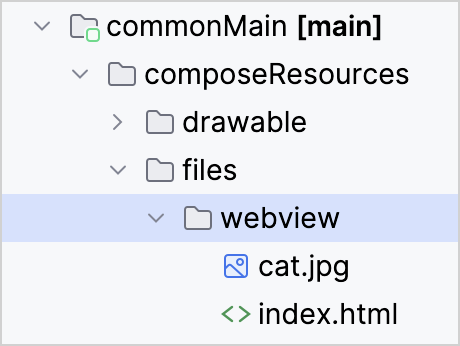
将多平台资源用作 Android 资产还可以通过简单的路径直接从 Android 上的 WebView 和媒体播放器组件访问,例如 Res.getUri("files/index.html")。
显示带有资源图像链接的资源 HTML 页面的 Android 可组合项示例:
// androidMain/kotlin/com/example/webview/App.kt
@OptIn(ExperimentalResourceApi::class)
@Composable
@Preview
fun App() {
    MaterialTheme {
        val uri = Res.getUri("files/webview/index.html")

        // Adding a WebView inside AndroidView with layout as full screen.
        AndroidView(factory = {
            WebView(it).apply {
                layoutParams = ViewGroup.LayoutParams(
                    ViewGroup.LayoutParams.MATCH_PARENT,
                    ViewGroup.LayoutParams.MATCH_PARENT
                )
            }
        }, update = {
            it.loadUrl(uri)
        })
    }
}
该示例适用于此简单的 HTML 文件:
<html>
<header>
    <title>
        Cat Resource
    </title>
</header>
<body>
    <img src="cat.jpg">
</body>
</html>
本例中的两个资源文件都位于 commonMain 源集中:
与其他库和资源的交互
访问来自外部库的多平台资源
如果你想使用项目中包含的其他库来处理多平台资源,可以将平台特定的文件路径传递给这些其他 API。 要获取平台特定的路径,请使用资源的项项目路径调用 Res.getUri() 函数:
val uri = Res.getUri("files/my_video.mp4")现在 uri 变量包含了文件的绝对路径,任何外部库都可以使用该路径以适合其的方式访问文件。
对于 Android 特定的用途,多平台资源也会作为 Android 资产打包。
远程文件
在资源库的上下文中,只有作为应用程序一部分的文件才被视为资源。
你可以使用专用库通过其 URL 从互联网加载远程文件:
使用 Java 资源
虽然你可以在 Compose Multiplatform 中使用 Java 资源,但它们无法受益于框架提供的扩展功能:生成的访问器、多模块支持、本地化等。考虑完全过渡到多平台资源库以释放这些潜力。
在 Compose Multiplatform 1.7.0 中,compose.ui 软件包中提供的资源 API 已弃用。如果你仍然需要使用 Java 资源,请将以下实现复制到你的项目中,以确保在升级到 Compose Multiplatform 1.7.0 或更高版本后代码仍能正常工作:
@Composable
internal fun painterResource(
    resourcePath: String
): Painter = when (resourcePath.substringAfterLast(".")) {
    "svg" -> rememberSvgResource(resourcePath)
    "xml" -> rememberVectorXmlResource(resourcePath)
    else -> rememberBitmapResource(resourcePath)
}

@Composable
internal fun rememberBitmapResource(path: String): Painter {
    return remember(path) { BitmapPainter(readResourceBytes(path).decodeToImageBitmap()) }
}

@Composable
internal fun rememberVectorXmlResource(path: String): Painter {
    val density = LocalDensity.current
    val imageVector = remember(density, path) { readResourceBytes(path).decodeToImageVector(density) }
    return rememberVectorPainter(imageVector)
}

@Composable
internal fun rememberSvgResource(path: String): Painter {
    val density = LocalDensity.current
    return remember(density, path) { readResourceBytes(path).decodeToSvgPainter(density) }
}

private object ResourceLoader
private fun readResourceBytes(resourcePath: String) =
    ResourceLoader.javaClass.classLoader.getResourceAsStream(resourcePath).readAllBytes()