
鼠标事件监听器
在您的桌面项目中,您可以监听各种鼠标事件,例如点击、移动、滚动或进入和退出输入区域。
undefined
点击监听器 (Click listeners)
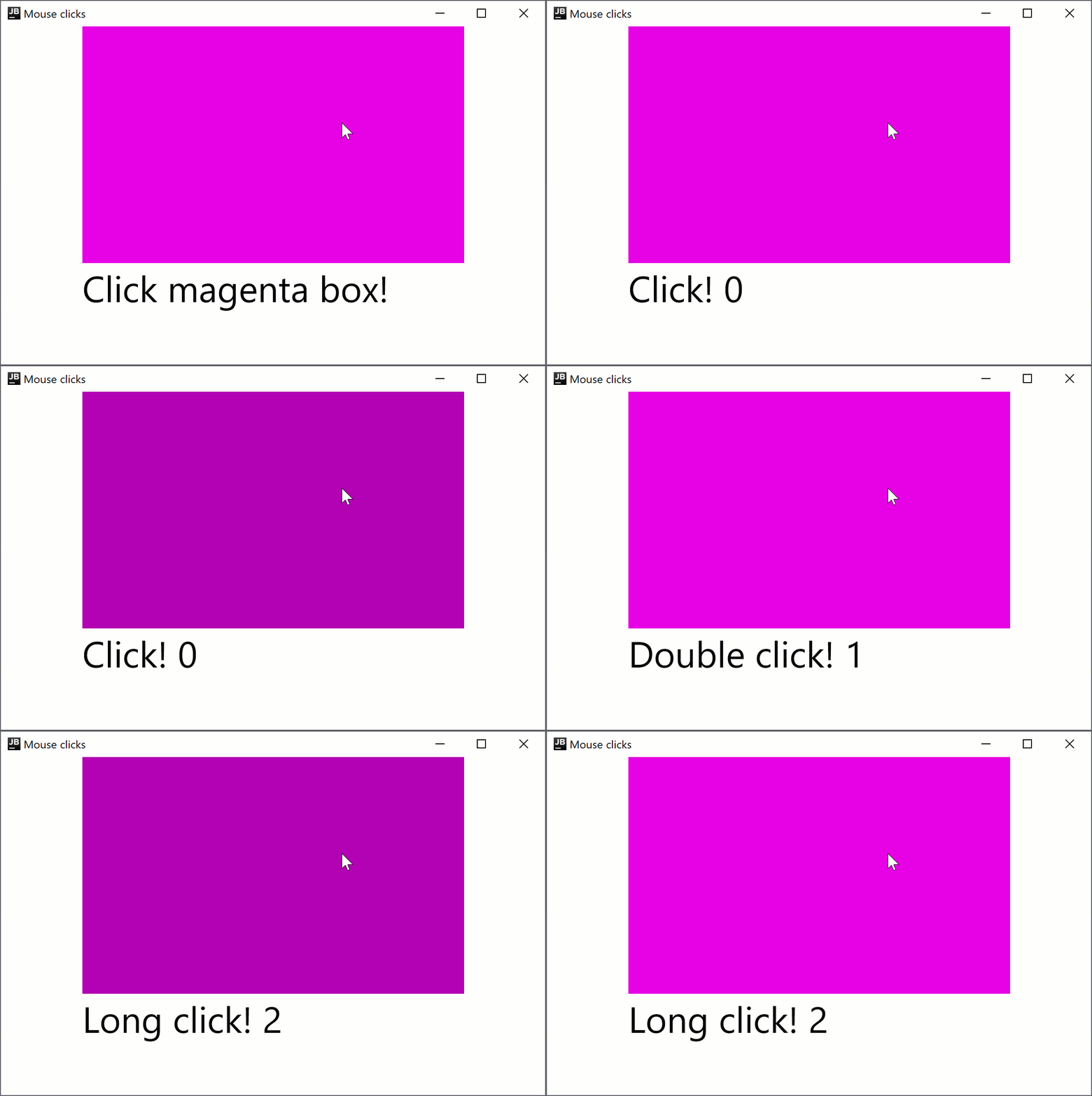
点击监听器在 Compose Multiplatform for Android 和 Compose Multiplatform for desktop 中均可用,因此您的代码可以在两个平台上运行。 例如,以下是使用 onClick、onDoubleClick 和 onLongClick 修饰符设置简单点击监听器的方法:
import androidx.compose.foundation.ExperimentalFoundationApi
import androidx.compose.foundation.background
import androidx.compose.foundation.combinedClickable
import androidx.compose.foundation.layout.Box
import androidx.compose.foundation.layout.Column
import androidx.compose.foundation.layout.fillMaxHeight
import androidx.compose.foundation.layout.fillMaxWidth
import androidx.compose.material.Text
import androidx.compose.runtime.getValue
import androidx.compose.runtime.mutableIntStateOf
import androidx.compose.runtime.mutableStateOf
import androidx.compose.runtime.remember
import androidx.compose.runtime.setValue
import androidx.compose.ui.Alignment
import androidx.compose.ui.Modifier
import androidx.compose.ui.graphics.Color
import androidx.compose.ui.unit.sp
import androidx.compose.ui.window.singleWindowApplication

fun main() = singleWindowApplication(title = "Mouse clicks") {
    var count by remember { mutableIntStateOf(0) }
    Box(contentAlignment = Alignment.Center, modifier = Modifier.fillMaxWidth()) {
        var text by remember { mutableStateOf("Click magenta box!") }
        Column {
            @OptIn(ExperimentalFoundationApi::class)
            Box(modifier = Modifier
                .background(Color.Magenta)
                .fillMaxWidth(0.7f)
                .fillMaxHeight(0.7f)
                .combinedClickable(
                    onClick = {
                        text = "Click! ${count++}"
                    },
                    onDoubleClick = {
                        text = "Double click! ${count++}"
                    },
                    onLongClick = {
                        text = "Long click! ${count++}"
                    }
                )
            )
            Text(text = text, fontSize = 40.sp)
        }
    }
}
combinedClickable 修饰符仅支持主按钮(鼠标左键)和触摸事件。如果您需要以不同方式处理按钮,请参阅 Modifier.onClick 部分。
移动监听器 (Move listeners)
onPointerEvent修饰符处于 实验性 阶段。需要选择加入(详情见下文),且您应仅将其用于评估目的。 有关 稳定 的 API,请参阅Modifier.pointerInput。
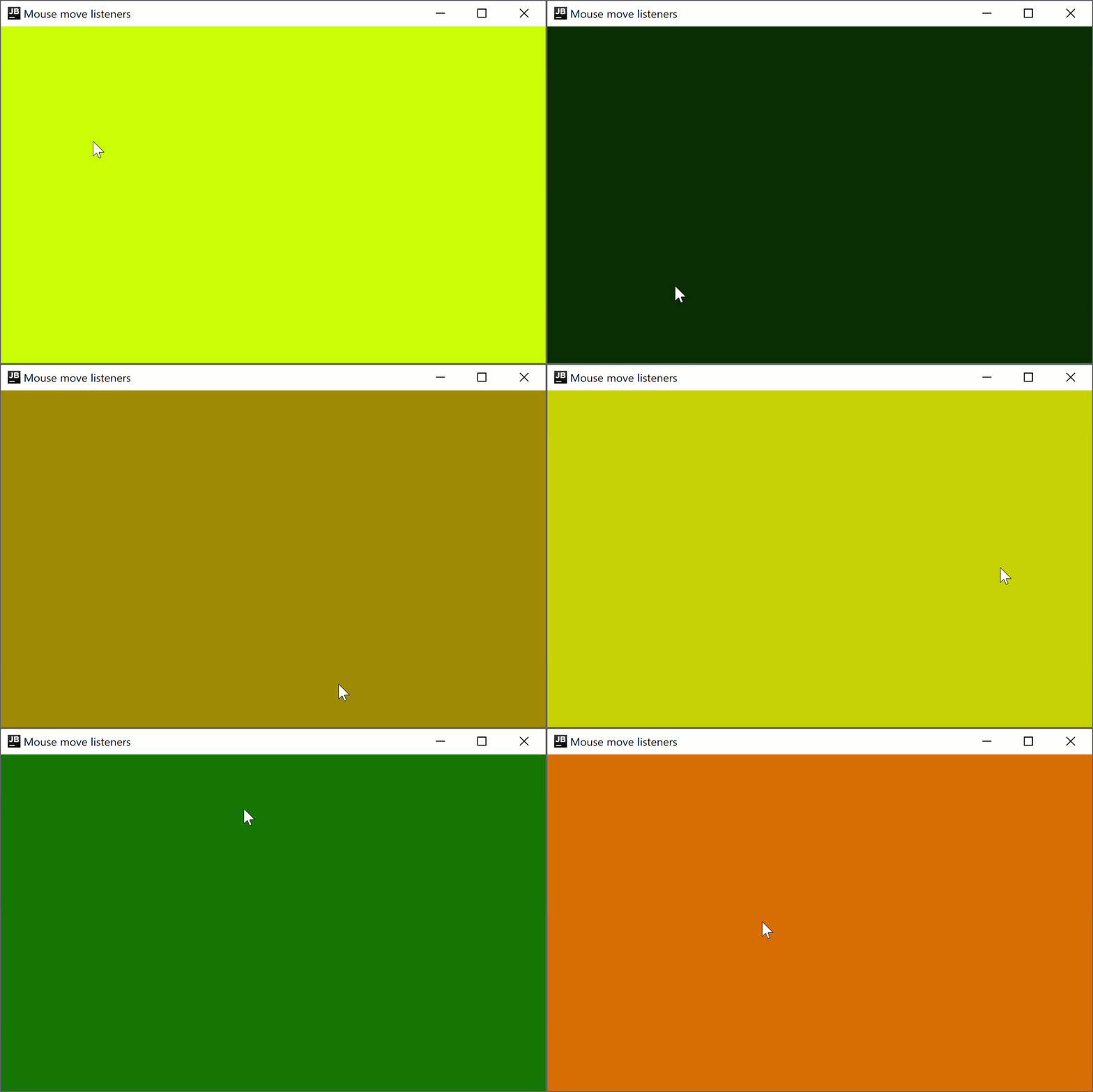
要创建一个根据鼠标指针位置更改窗口背景颜色的指针移动监听器,请添加以下代码:
import androidx.compose.foundation.background
import androidx.compose.foundation.layout.Box
import androidx.compose.foundation.layout.fillMaxSize
import androidx.compose.foundation.layout.wrapContentSize
import androidx.compose.runtime.getValue
import androidx.compose.runtime.mutableStateOf
import androidx.compose.runtime.remember
import androidx.compose.runtime.setValue
import androidx.compose.ui.Alignment
import androidx.compose.ui.ExperimentalComposeUiApi
import androidx.compose.ui.Modifier
import androidx.compose.ui.graphics.Color
import androidx.compose.ui.input.pointer.PointerEventType
import androidx.compose.ui.input.pointer.onPointerEvent
import androidx.compose.ui.window.singleWindowApplication

@OptIn(ExperimentalComposeUiApi::class)
fun main() = singleWindowApplication(title = "Mouse move listeners") {
    var color by remember { mutableStateOf(Color(0, 0, 0)) }
    Box(modifier = Modifier
        .wrapContentSize(Alignment.Center)
        .fillMaxSize()
        .background(color = color)
        .onPointerEvent(PointerEventType.Move) {
            val position = it.changes.first().position
            color = Color(position.x.toInt() % 256, position.y.toInt() % 256, 0)
        }
    )
}
进入监听器 (Enter listeners)
onPointerEvent修饰符处于 实验性 阶段。需要选择加入(详情见下文),且您应仅将其用于评估目的。 有关 稳定 的 API,请参阅Modifier.pointerInput。
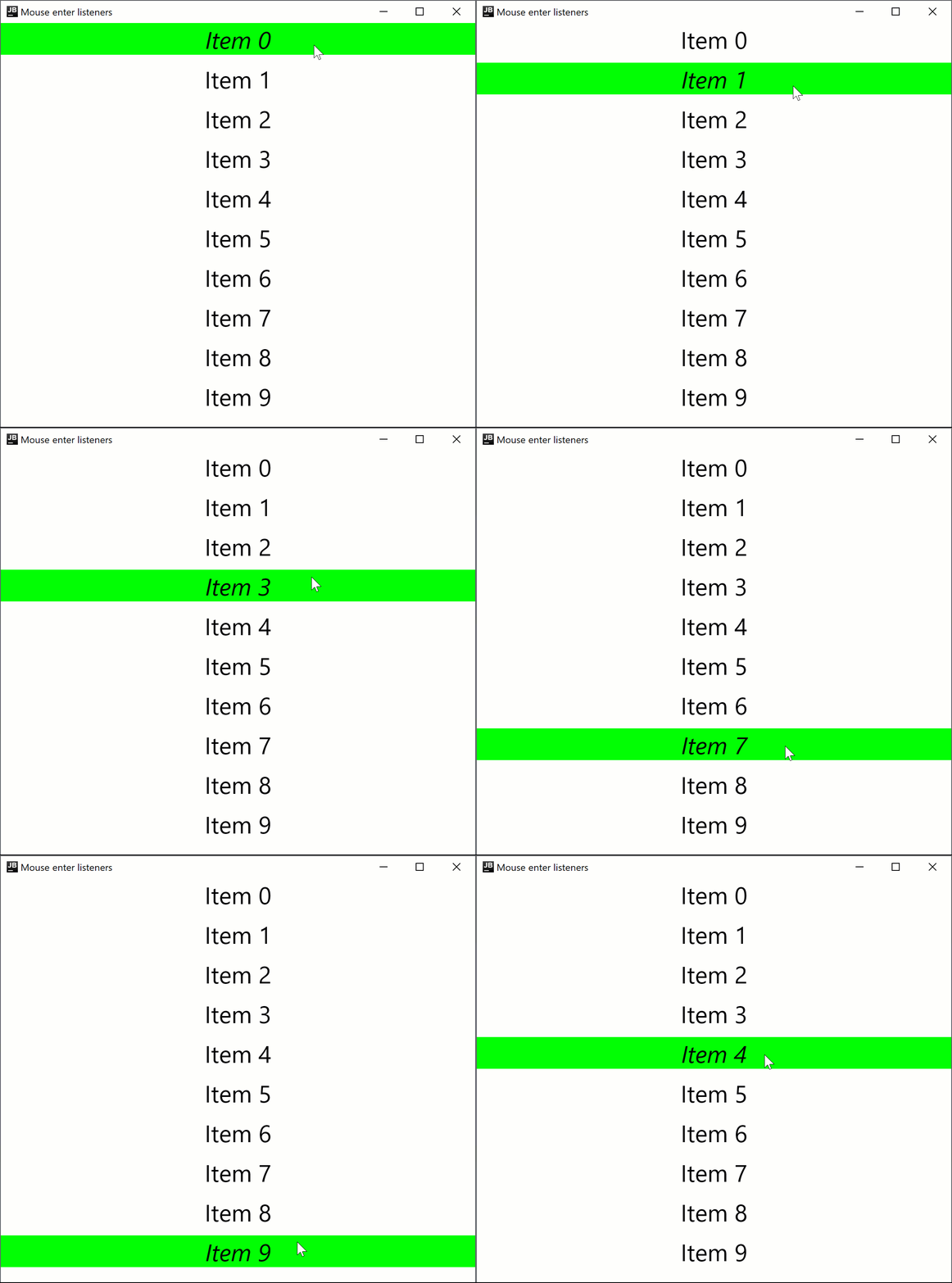
Compose Multiplatform for desktop 支持指针进入和退出输入区域的处理程序。例如,以下代码将在悬停时更改一行的字体样式:
import androidx.compose.foundation.background
import androidx.compose.foundation.layout.Arrangement
import androidx.compose.foundation.layout.Column
import androidx.compose.foundation.layout.fillMaxWidth
import androidx.compose.material.Text
import androidx.compose.runtime.getValue
import androidx.compose.runtime.mutableStateOf
import androidx.compose.runtime.remember
import androidx.compose.runtime.setValue
import androidx.compose.ui.ExperimentalComposeUiApi
import androidx.compose.ui.Modifier
import androidx.compose.ui.graphics.Color
import androidx.compose.ui.input.pointer.PointerEventType
import androidx.compose.ui.input.pointer.onPointerEvent
import androidx.compose.ui.text.font.FontStyle
import androidx.compose.ui.text.style.TextAlign
import androidx.compose.ui.unit.dp
import androidx.compose.ui.unit.sp
import androidx.compose.ui.window.singleWindowApplication

@OptIn(ExperimentalComposeUiApi::class)
fun main() = singleWindowApplication(title = "Mouse enter listeners") {
    Column(
        Modifier.background(Color.White),
        verticalArrangement = Arrangement.spacedBy(10.dp),
    ) {
        repeat(10) { index ->
            var active by remember { mutableStateOf(false) }
            Text(modifier = Modifier
                .fillMaxWidth()
                .background(color = if (active) Color.Green else Color.White)
                .onPointerEvent(PointerEventType.Enter) { active = true }
                .onPointerEvent(PointerEventType.Exit) { active = false },
                fontSize = 30.sp,
                fontStyle = if (active) FontStyle.Italic else FontStyle.Normal,
                text = "Item $index",
                textAlign = TextAlign.Center
            )
        }
    }
}
滚动监听器 (Scroll listeners)
onPointerEvent修饰符处于 实验性 阶段。需要选择加入(详情见下文),且您应仅将其用于评估目的。 有关 稳定 的 API,请参阅Modifier.pointerInput。
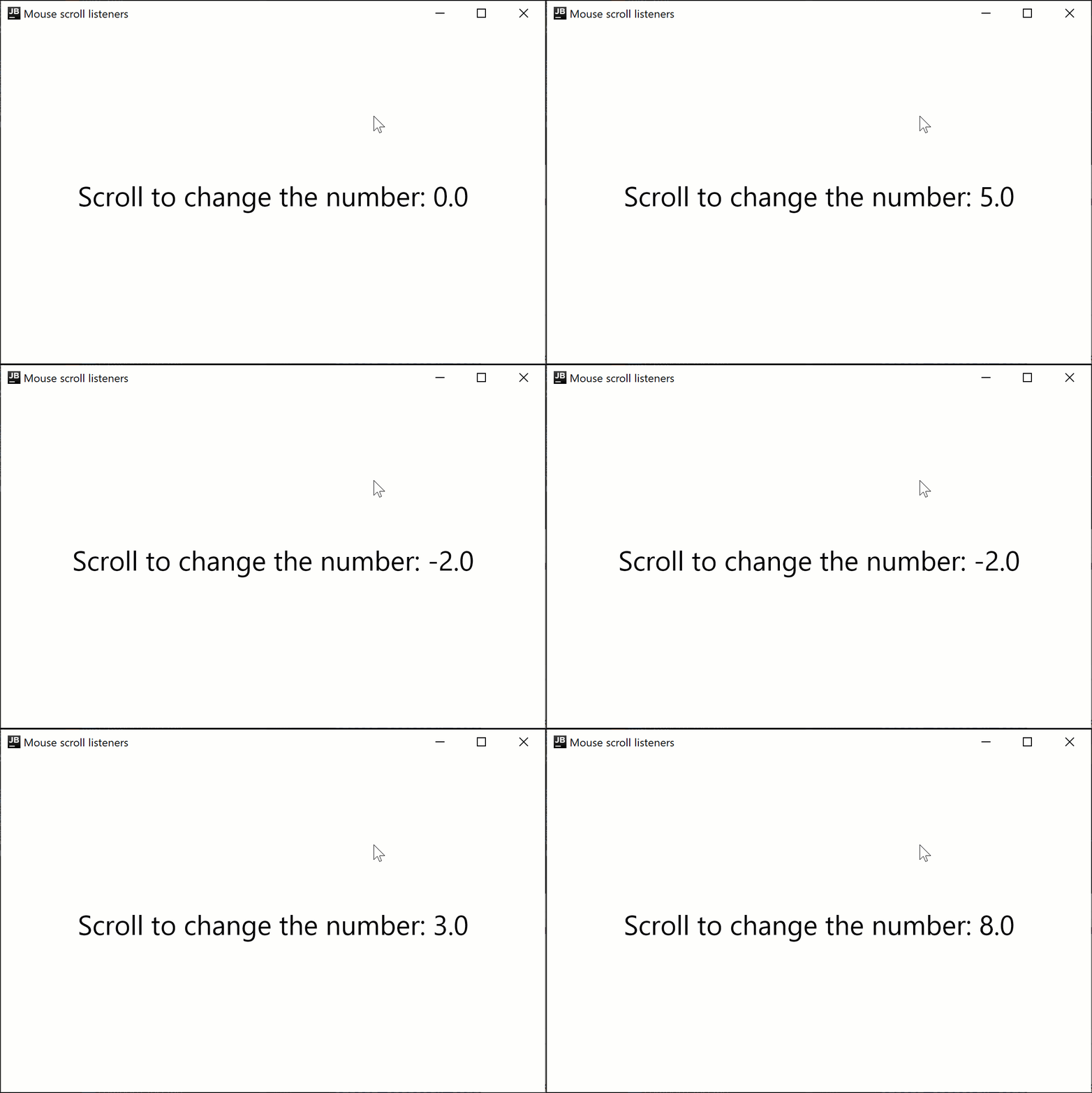
以下代码示例展示了如何根据鼠标滚动方向增加或减少显示的数字:
import androidx.compose.foundation.layout.Box
import androidx.compose.foundation.layout.fillMaxSize
import androidx.compose.material.Text
import androidx.compose.runtime.getValue
import androidx.compose.runtime.mutableFloatStateOf
import androidx.compose.runtime.remember
import androidx.compose.runtime.setValue
import androidx.compose.ui.Alignment
import androidx.compose.ui.ExperimentalComposeUiApi
import androidx.compose.ui.Modifier
import androidx.compose.ui.input.pointer.PointerEventType
import androidx.compose.ui.input.pointer.onPointerEvent
import androidx.compose.ui.unit.sp
import androidx.compose.ui.window.singleWindowApplication

@OptIn(ExperimentalComposeUiApi::class)
fun main() = singleWindowApplication(title = "Mouse scroll listeners") {
    var number by remember { mutableFloatStateOf(0f) }
    Box(
        Modifier
            .fillMaxSize()
            .onPointerEvent(PointerEventType.Scroll) {
                number += it.changes.first().scrollDelta.y
            },
        contentAlignment = Alignment.Center
    ) {
        Text("Scroll to change the number: $number", fontSize = 30.sp)
    }
}
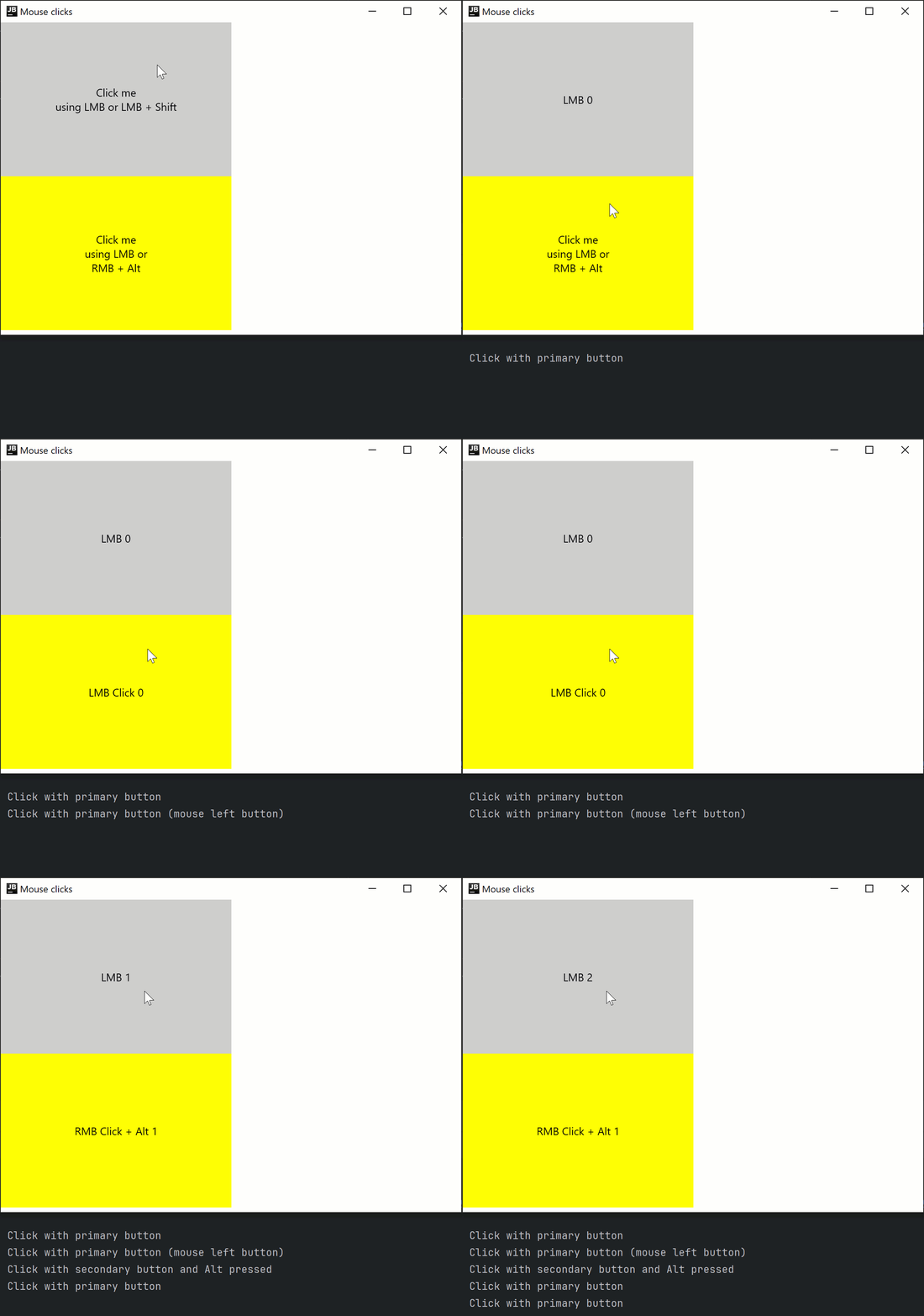
实验性 onClick 处理程序
onClick修饰符处于 实验性 阶段且仅在桌面项目中受支持。需要选择加入(详情见下文),且您应仅将其用于评估目的。
Modifier.onClick 为点击、双击和长按提供独立的回调。它仅处理源自指针事件的点击,并且不提供开箱即用的无障碍 click 事件处理。
您可以使用 matcher: PointerMatcher 和 keyboardModifiers: PointerKeyboardModifiers.() -> Boolean 将每个 onClick 配置为针对特定的指针事件:
matcher允许您选择哪个鼠标按钮应触发点击事件。keyboardModifiers允许您过滤按下了指定键的指针事件。
您还可以创建一个包含多个 onClick 修饰符的链,以处理具有不同匹配器和键盘修饰符条件的各种点击。 与 clickable 不同,onClick 没有默认的 Modifier.indication 和 Modifier.semantics,并且在您按下 时不会触发点击事件。如有必要,请单独添加这些修饰符。 您应在其他处理程序之前声明最通用的(条件最少的)onClick 处理程序,以确保事件的正确传播。
import androidx.compose.animation.AnimatedContent
import androidx.compose.foundation.ExperimentalFoundationApi
import androidx.compose.foundation.LocalIndication
import androidx.compose.foundation.PointerMatcher
import androidx.compose.foundation.background
import androidx.compose.foundation.indication
import androidx.compose.foundation.interaction.MutableInteractionSource
import androidx.compose.foundation.layout.Box
import androidx.compose.foundation.layout.Column
import androidx.compose.foundation.layout.size
import androidx.compose.foundation.onClick
import androidx.compose.material.Text
import androidx.compose.runtime.*
import androidx.compose.ui.Alignment
import androidx.compose.ui.Modifier
import androidx.compose.ui.graphics.Color
import androidx.compose.ui.input.pointer.PointerButton
import androidx.compose.ui.input.pointer.isAltPressed
import androidx.compose.ui.input.pointer.isShiftPressed
import androidx.compose.ui.text.style.TextAlign
import androidx.compose.ui.unit.dp
import androidx.compose.ui.window.singleWindowApplication

@OptIn(ExperimentalFoundationApi::class)
fun main() = singleWindowApplication(title = "Mouse clicks") {
    Column {
        var topBoxText by remember { mutableStateOf("Click me
using LMB or LMB + Shift") }
        var topBoxCount by remember { mutableIntStateOf(0) }
        // 交互时没有指示 (indication)
        Box(modifier = Modifier
            .size(300.dp, 200.dp)
            .background(Color.LightGray)
            // 最通用的点击处理程序(没有额外条件的)应该是第一个
            .onClick {
                // 接收除按下 Shift 键以外的所有鼠标左键点击
                println("Click with primary button")
                topBoxText = "LMB ${topBoxCount++}"
            }.onClick(
                keyboardModifiers = { isShiftPressed } // 仅在按下 Shift 时接受点击
            ) {
                // 接收按下 Shift 键时的所有鼠标左键点击
                println("Click with primary button and shift pressed")
                topBoxCount++
                topBoxText = "LMB + Shift ${topBoxCount++}"
            }
        ) {
            AnimatedContent(
                targetState = topBoxText,
                modifier = Modifier.align(Alignment.Center)
            ) {
                Text(text = it, textAlign = TextAlign.Center)
            }
        }

        var bottomBoxText by remember { mutableStateOf("Click me
using LMB or
RMB + Alt") }
        var bottomBoxCount by remember { mutableStateOf(0) }
        val interactionSource = remember { MutableInteractionSource() }
        // 交互时带有指示 (indication)
        Box(modifier = Modifier
            .size(300.dp, 200.dp)
            .background(Color.Yellow)
            .onClick(
                enabled = true,
                interactionSource = interactionSource,
                matcher = PointerMatcher.mouse(PointerButton.Secondary), // 鼠标右键
                keyboardModifiers = { isAltPressed }, // 仅在按下 Alt 时接受点击
                onLongClick = { // 可选
                    bottomBoxText = "RMB Long Click + Alt ${bottomBoxCount++}"
                    println("Long Click with secondary button and Alt pressed")
                },
                onDoubleClick = { // 可选
                    bottomBoxText = "RMB Double Click + Alt ${bottomBoxCount++}"
                    println("Double Click with secondary button and Alt pressed")
                },
                onClick = {
                    bottomBoxText = "RMB Click + Alt ${bottomBoxCount++}"
                    println("Click with secondary button and Alt pressed")
                }
            )
            .onClick(interactionSource = interactionSource) { // 使用默认参数
                bottomBoxText = "LMB Click ${bottomBoxCount++}"
                println("Click with primary button (mouse left button)")
            }
            .indication(interactionSource, LocalIndication.current)
        ) {
            AnimatedContent(
                targetState = bottomBoxText,
                modifier = Modifier.align(Alignment.Center)
            ) {
                Text(text = it, textAlign = TextAlign.Center)
            }
        }
    }
}
实验性 onDrag 修饰符
onDrag修饰符处于 实验性 阶段且仅在桌面项目中受支持。需要选择加入(详情见下文),且您应仅将其用于评估目的。
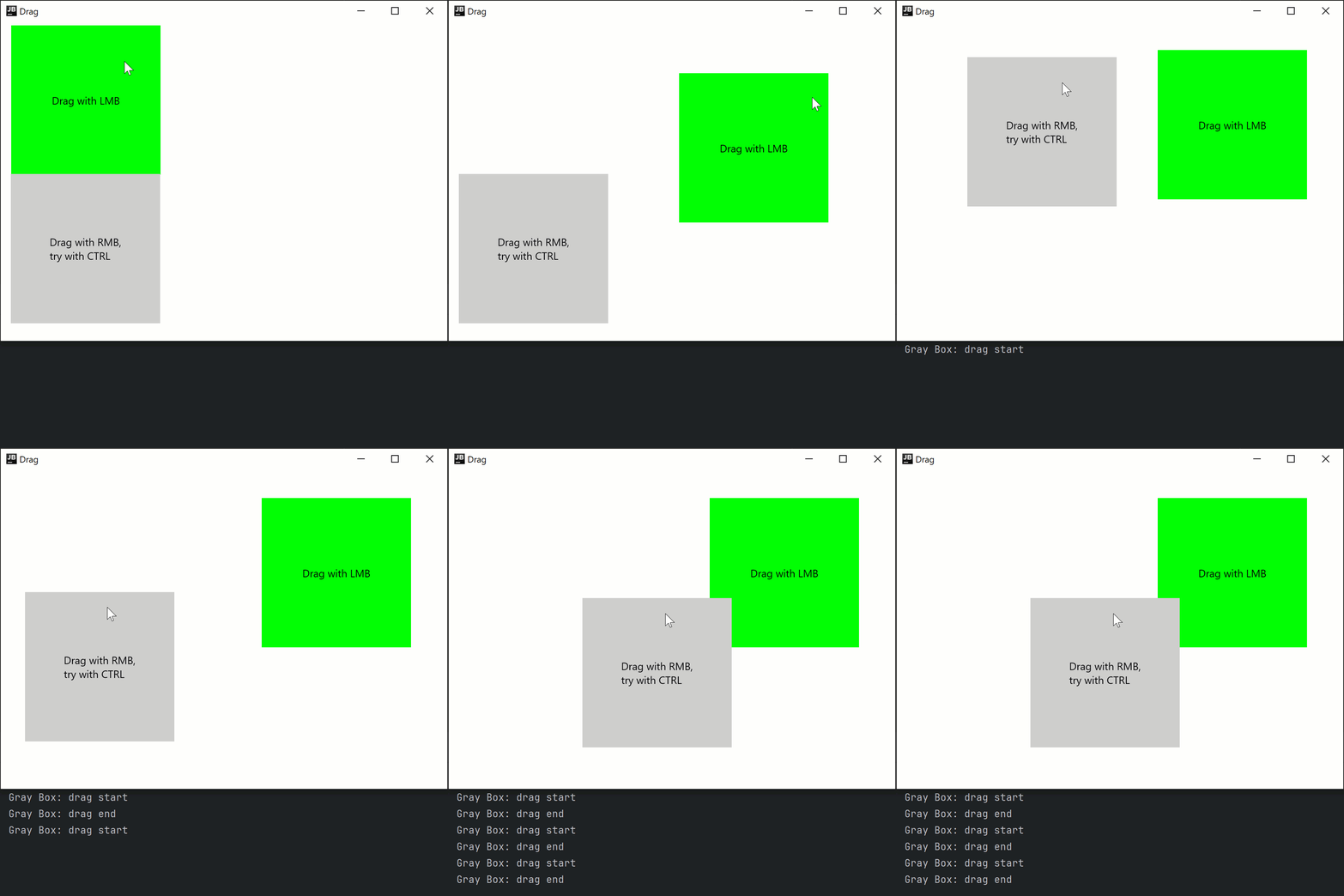
通过 Modifier.onDrag,您可以使用 matcher: PointerMatcher 指定应触发拖动的指针。与 onClick 类似,您可以将多个 onDrag 修饰符链接在一起。
您还可以通过 LocalWindowInfo.current.keyboardModifier 检查键盘修饰符的状态,用于按键可以改变拖动行为的情况。例如,通过简单的拖动移动项目,并在按下 键拖动时复制/粘贴项目。
以下代码示例展示了如何处理由鼠标左键和右键触发以及涉及键盘的拖动事件:
import androidx.compose.foundation.ExperimentalFoundationApi
import androidx.compose.foundation.PointerMatcher
import androidx.compose.foundation.background
import androidx.compose.foundation.gestures.onDrag
import androidx.compose.foundation.layout.Box
import androidx.compose.foundation.layout.Column
import androidx.compose.foundation.layout.offset
import androidx.compose.foundation.layout.size
import androidx.compose.material.Text
import androidx.compose.runtime.getValue
import androidx.compose.runtime.mutableStateOf
import androidx.compose.runtime.remember
import androidx.compose.runtime.setValue
import androidx.compose.ui.Alignment
import androidx.compose.ui.Modifier
import androidx.compose.ui.geometry.Offset
import androidx.compose.ui.graphics.Color
import androidx.compose.ui.input.pointer.PointerButton
import androidx.compose.ui.input.pointer.isCtrlPressed
import androidx.compose.ui.platform.LocalWindowInfo
import androidx.compose.ui.unit.IntOffset
import androidx.compose.ui.unit.dp
import androidx.compose.ui.window.singleWindowApplication

@OptIn(ExperimentalFoundationApi::class)
fun main() = singleWindowApplication(title = "Drag") {
    val windowInfo = LocalWindowInfo.current

    Column {
        var topBoxOffset by remember { mutableStateOf(Offset(0f, 0f)) }

        Box(modifier = Modifier
            .offset {
                IntOffset(topBoxOffset.x.toInt(), topBoxOffset.y.toInt())
            }
            .size(200.dp)
            .background(Color.Green)
            .onDrag { // 默认:enabled = true, matcher = PointerMatcher.Primary (鼠标左键)
                topBoxOffset += it
            }
        ) {
            Text(text = "Drag with LMB", modifier = Modifier.align(Alignment.Center))
        }

        var bottomBoxOffset by remember { mutableStateOf(Offset(0f, 0f)) }

        Box(modifier = Modifier
            .offset {
                IntOffset(bottomBoxOffset.x.toInt(), bottomBoxOffset.y.toInt())
            }
            .size(200.dp)
            .background(Color.LightGray)
            .onDrag(
                matcher = PointerMatcher.mouse(PointerButton.Secondary), // 鼠标右键
                onDragStart = {
                    println("Gray Box: drag start")
                },
                onDragEnd = {
                    println("Gray Box: drag end")
                }
            ) {
                val keyboardModifiers = windowInfo.keyboardModifiers
                bottomBoxOffset += if (keyboardModifiers.isCtrlPressed) it * 2f else it
            }
        ) {
            Text(
                text = "Drag with RMB,
try with CTRL",
                modifier = Modifier.align(Alignment.Center)
            )
        }
    }
}
还有一种非修饰符的方法可以使用 suspend fun PointerInputScope.detectDragGestures 来处理拖动:
import androidx.compose.foundation.ExperimentalFoundationApi
import androidx.compose.foundation.PointerMatcher
import androidx.compose.foundation.background
import androidx.compose.foundation.gestures.detectDragGestures
import androidx.compose.foundation.layout.Box
import androidx.compose.foundation.layout.offset
import androidx.compose.foundation.layout.size
import androidx.compose.material.Text
import androidx.compose.runtime.getValue
import androidx.compose.runtime.mutableStateOf
import androidx.compose.runtime.remember
import androidx.compose.runtime.setValue
import androidx.compose.ui.Alignment
import androidx.compose.ui.Modifier
import androidx.compose.ui.geometry.Offset
import androidx.compose.ui.graphics.Color
import androidx.compose.ui.input.pointer.pointerInput
import androidx.compose.ui.unit.IntOffset
import androidx.compose.ui.unit.dp
import androidx.compose.ui.window.singleWindowApplication

@OptIn(ExperimentalFoundationApi::class)
fun main() = singleWindowApplication(title = "Drag") {
    var topBoxOffset by remember { mutableStateOf(Offset(0f, 0f)) }

    Box(modifier = Modifier
        .offset {
            IntOffset(topBoxOffset.x.toInt(), topBoxOffset.y.toInt())
        }
        .size(200.dp)
        .background(Color.Green)
        .pointerInput(Unit) {
            detectDragGestures(
                matcher = PointerMatcher.Primary
            ) {
                topBoxOffset += it
            }
        }
    ) {
        Text(text = "Drag with LMB", modifier = Modifier.align(Alignment.Center))
    }
}
通过 Swing 互操作性访问原始 AWT 事件
onPointerEvent修饰符处于 实验性 阶段。需要选择加入(详情见下文),且您应仅将其用于评估目的。 有关 稳定 的 API,请参阅Modifier.pointerInput。
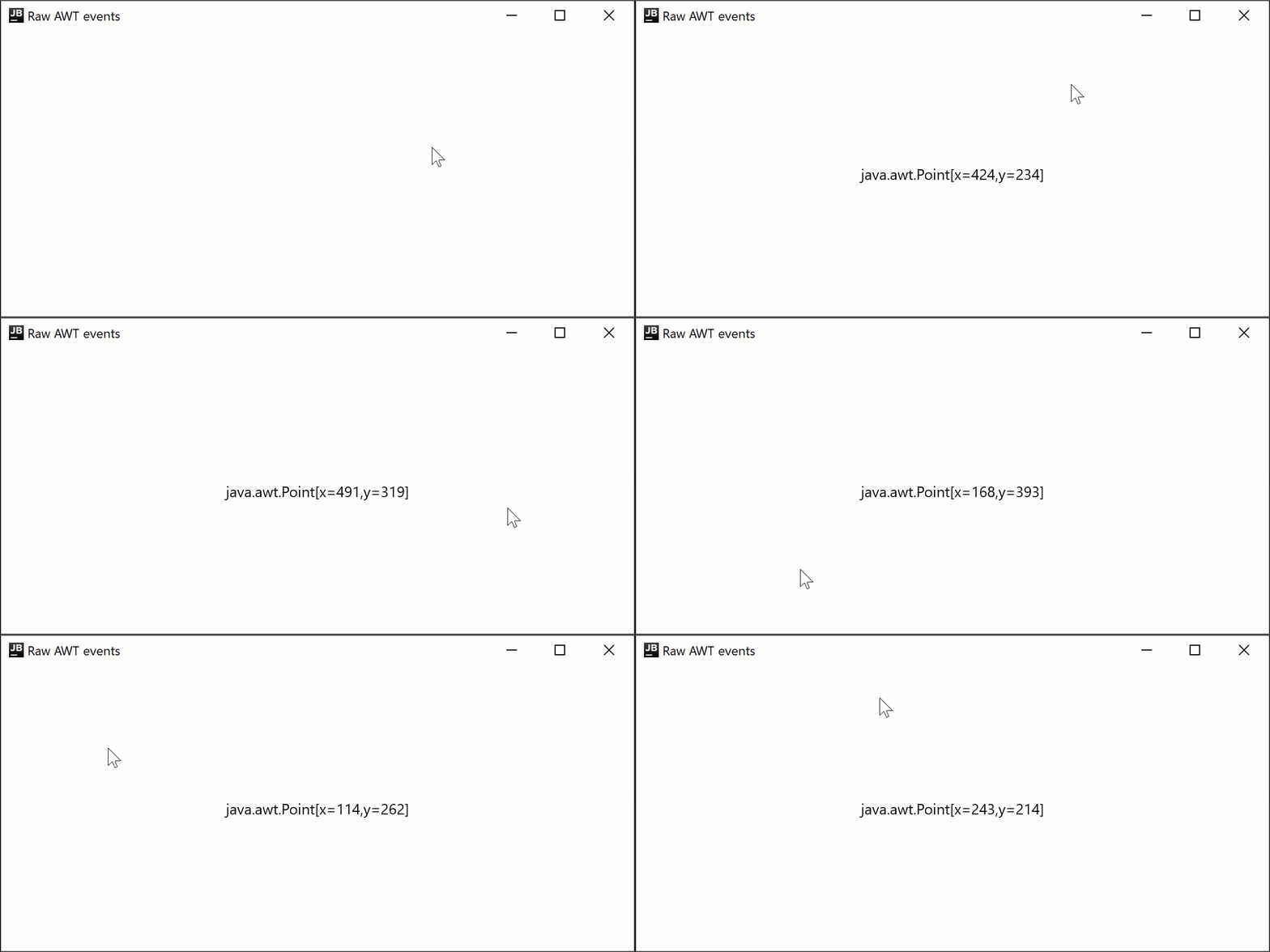
Compose Multiplatform for desktop 在底层使用 Swing,并允许访问原始 AWT 事件:
import androidx.compose.foundation.layout.Box
import androidx.compose.foundation.layout.fillMaxSize
import androidx.compose.material.Text
import androidx.compose.runtime.getValue
import androidx.compose.runtime.mutableStateOf
import androidx.compose.runtime.remember
import androidx.compose.runtime.setValue
import androidx.compose.ui.Alignment
import androidx.compose.ui.ExperimentalComposeUiApi
import androidx.compose.ui.Modifier
import androidx.compose.ui.awt.awtEventOrNull
import androidx.compose.ui.input.pointer.PointerEventType
import androidx.compose.ui.input.pointer.onPointerEvent
import androidx.compose.ui.window.singleWindowApplication

@OptIn(ExperimentalComposeUiApi::class)
fun main() = singleWindowApplication(title = "Raw AWT events") {
    var text by remember { mutableStateOf("") }

    Box(
        Modifier
            .fillMaxSize()
            .onPointerEvent(PointerEventType.Press) {
                text = it.awtEventOrNull?.locationOnScreen?.toString().orEmpty()
            },
        contentAlignment = Alignment.Center
    ) {
        Text(text)
    }
}
在公共代码中通过 pointerInput 监听原始事件
在上面的代码片段中,我们使用了 Modifier.onPointerEvent 函数,这是一个订阅某种指针事件类型的辅助函数。它是 Modifier.pointerInput 函数的一种新的简短变体。它目前处于实验性阶段且仅限桌面端,因此您无法在公共代码中使用它。
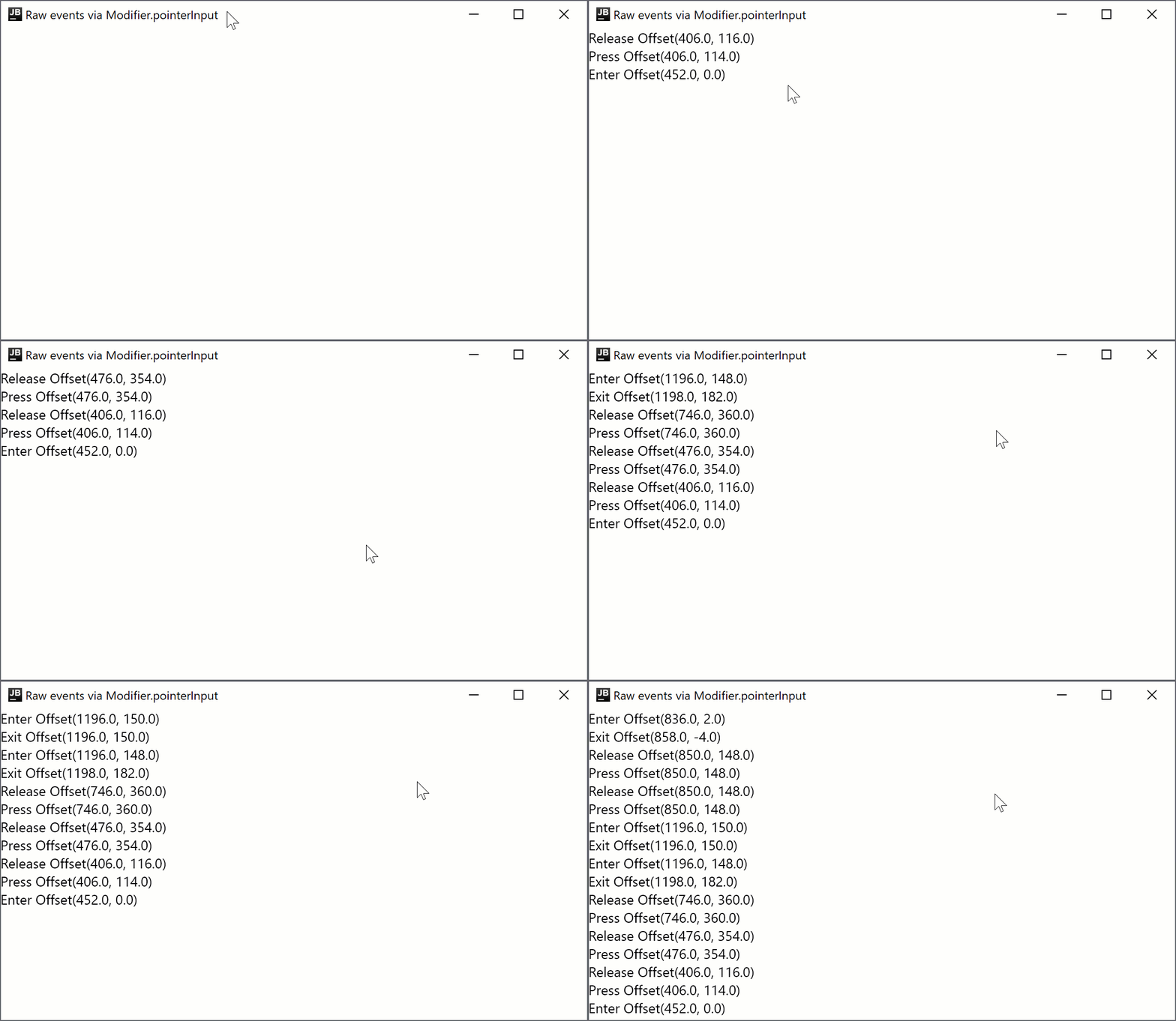
如果您需要在公共代码中订阅事件,或者需要稳定的 API,可以使用 Modifier.pointerInput 函数:
import androidx.compose.foundation.layout.Column
import androidx.compose.foundation.layout.fillMaxSize
import androidx.compose.material.Text
import androidx.compose.runtime.mutableStateListOf
import androidx.compose.runtime.remember
import androidx.compose.ui.Modifier
import androidx.compose.ui.input.pointer.PointerEventType
import androidx.compose.ui.input.pointer.pointerInput
import androidx.compose.ui.window.singleWindowApplication

fun main() = singleWindowApplication(title = "Raw events via Modifier.pointerInput") {
    val list = remember { mutableStateListOf<String>() }

    Column(
        Modifier
            .fillMaxSize()
            .pointerInput(Unit) {
                awaitPointerEventScope {
                    while (true) {
                        val event = awaitPointerEvent()
                        val position = event.changes.first().position
                        // 在每次重新布局时,Compose 都会发送一个合成的 Move 事件,
                        // 因此我们将其跳过以避免事件泛滥
                        if (event.type != PointerEventType.Move) {
                            list.add(0, "${event.type} $position")
                        }
                    }
                }
            },
    ) {
        for (item in list.take(20)) {
            Text(item)
        }
    }
}
下一步
探索有关 其他桌面组件 的教程。