
上下文菜单
Compose Multiplatform 桌面版提供了对文本上下文菜单的开箱即用支持,并允许你通过添加更多项、进行主题设置和自定义文本来方便地定制任何上下文菜单。
undefined
自定义区域中的上下文菜单
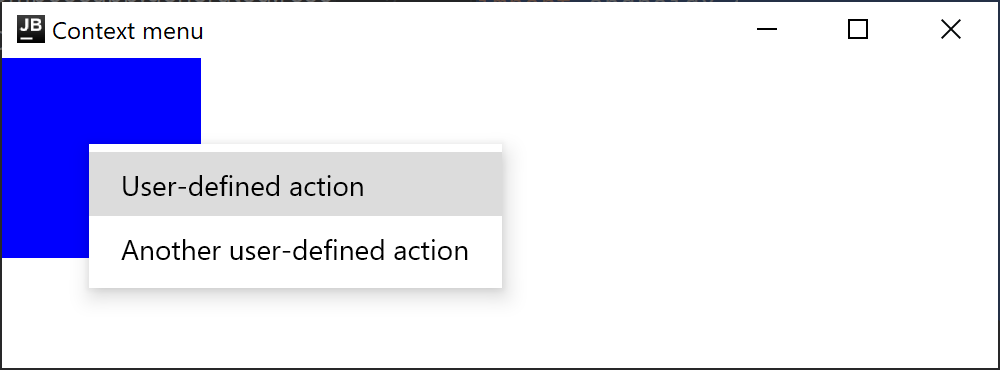
你可以为应用程序的任意区域创建上下文菜单。使用 ContextMenuArea 定义一个容器,在该容器中点击鼠标右键将触发上下文菜单的显示:
import androidx.compose.foundation.ContextMenuArea
import androidx.compose.foundation.ContextMenuItem
import androidx.compose.foundation.background
import androidx.compose.foundation.layout.Box
import androidx.compose.foundation.layout.height
import androidx.compose.foundation.layout.width
import androidx.compose.ui.Modifier
import androidx.compose.ui.graphics.Color
import androidx.compose.ui.unit.dp
import androidx.compose.ui.window.singleWindowApplication

fun main() = singleWindowApplication(title = "Context menu") {
    ContextMenuArea(items = {
        listOf(
            ContextMenuItem("User-defined action") {
                // 自定义操作
            },
            ContextMenuItem("Another user-defined action") {
                // 另一个自定义操作
            }
        )
    }) {
        // 提供上下文菜单的蓝色方块
        Box(modifier = Modifier.background(Color.Blue).height(100.dp).width(100.dp))
    }
}
设置主题
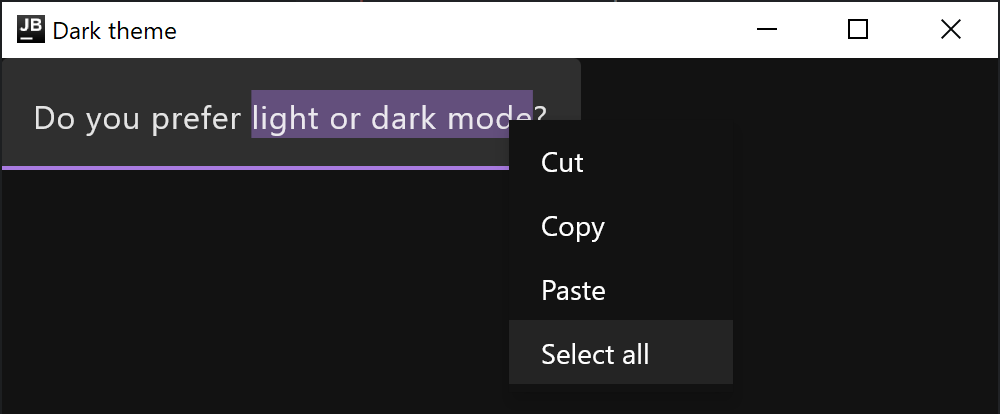
你可以自定义上下文菜单颜色,以创建与系统设置匹配的响应式 UI,并避免在应用程序之间切换时出现剧烈的对比度变化。对于默认的浅色和深色主题,有两个内置实现:LightDefaultContextMenuRepresentation 和 DarkDefaultContextMenuRepresentation。它们不会自动应用于上下文菜单颜色,因此你需要通过 LocalContextMenuRepresentation 设置合适的主题:
import androidx.compose.foundation.DarkDefaultContextMenuRepresentation
import androidx.compose.foundation.LightDefaultContextMenuRepresentation
import androidx.compose.foundation.LocalContextMenuRepresentation
import androidx.compose.foundation.isSystemInDarkTheme
import androidx.compose.foundation.layout.Box
import androidx.compose.foundation.layout.fillMaxSize
import androidx.compose.material.MaterialTheme
import androidx.compose.material.Surface
import androidx.compose.material.TextField
import androidx.compose.material.darkColors
import androidx.compose.material.lightColors
import androidx.compose.runtime.CompositionLocalProvider
import androidx.compose.runtime.getValue
import androidx.compose.runtime.mutableStateOf
import androidx.compose.runtime.remember
import androidx.compose.runtime.setValue
import androidx.compose.ui.Modifier
import androidx.compose.ui.window.singleWindowApplication

fun main() = singleWindowApplication(title = "Dark theme") {
    MaterialTheme(
        colors = if (isSystemInDarkTheme()) darkColors() else lightColors()
    ) {
        val contextMenuRepresentation = if (isSystemInDarkTheme()) {
            DarkDefaultContextMenuRepresentation
        } else {
            LightDefaultContextMenuRepresentation
        }
        CompositionLocalProvider(LocalContextMenuRepresentation provides contextMenuRepresentation) {
            Surface(Modifier.fillMaxSize()) {
                Box {
                    var value by remember { mutableStateOf("") }
                    TextField(value, { value = it })
                }
            }
        }
    }
}
本地化菜单项
默认情况下,上下文菜单将以系统设置的首选语言显示:
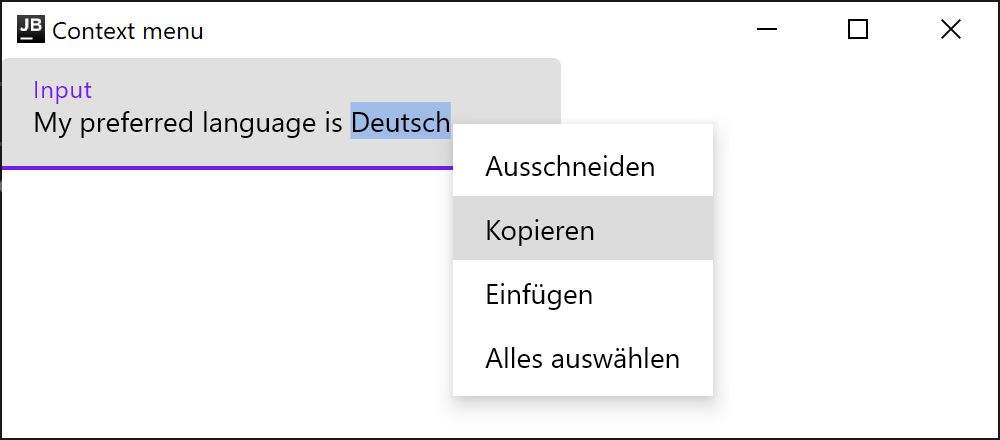
如果你想使用特定语言,请在运行应用程序之前显式将其指定为默认语言:
java.util.Locale.setDefault(java.util.Locale("en"))文本上下文菜单
默认文本上下文菜单
Compose Multiplatform 桌面版为 TextField 和可选择的 Text 提供了内置的上下文菜单。
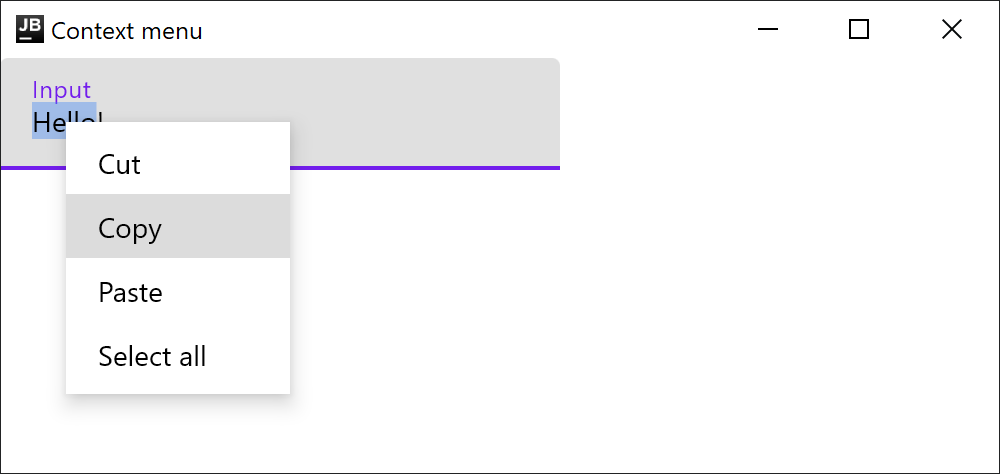
文本字段的默认上下文菜单包括以下操作,具体取决于文本光标的位置和选择范围:复制、剪切、粘贴和全选。此标准上下文菜单在 Material TextField(androidx.compose.material.TextField 或 androidx.compose.material3.TextField)和 Foundation BasicTextField(androidx.compose.foundation.text.BasicTextField)中默认可用。
import androidx.compose.material.Text
import androidx.compose.material.TextField
import androidx.compose.runtime.mutableStateOf
import androidx.compose.runtime.remember
import androidx.compose.ui.window.singleWindowApplication

fun main() = singleWindowApplication(title = "Context menu") {
    val text = remember { mutableStateOf("Hello!") }
    TextField(
        value = text.value,
        onValueChange = { text.value = it },
        label = { Text(text = "Input") }
    )
}
详情请参阅 API 参考文档。
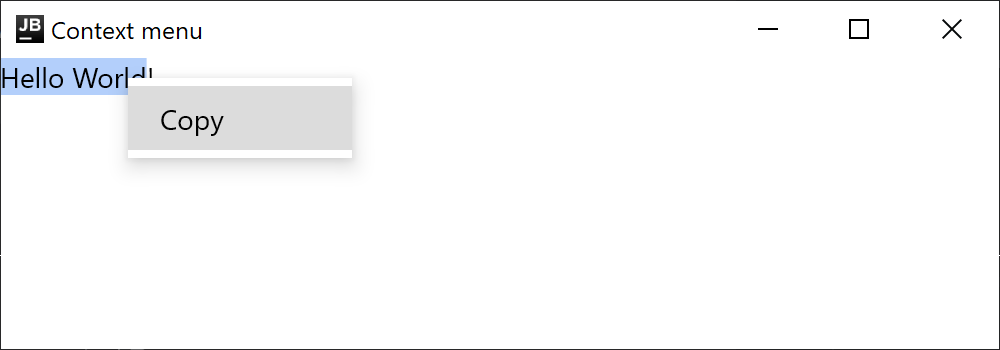
简单文本元素的默认上下文菜单仅包含复制操作。要为 Text 组件启用上下文菜单,请将其包装在 SelectionContainer 中使文本可被选择:
import androidx.compose.foundation.text.selection.SelectionContainer
import androidx.compose.material.Text
import androidx.compose.ui.window.singleWindowApplication

fun main() = singleWindowApplication(title = "Context menu") {
    SelectionContainer {
        Text("Hello World!")
    }
}
添加自定义项
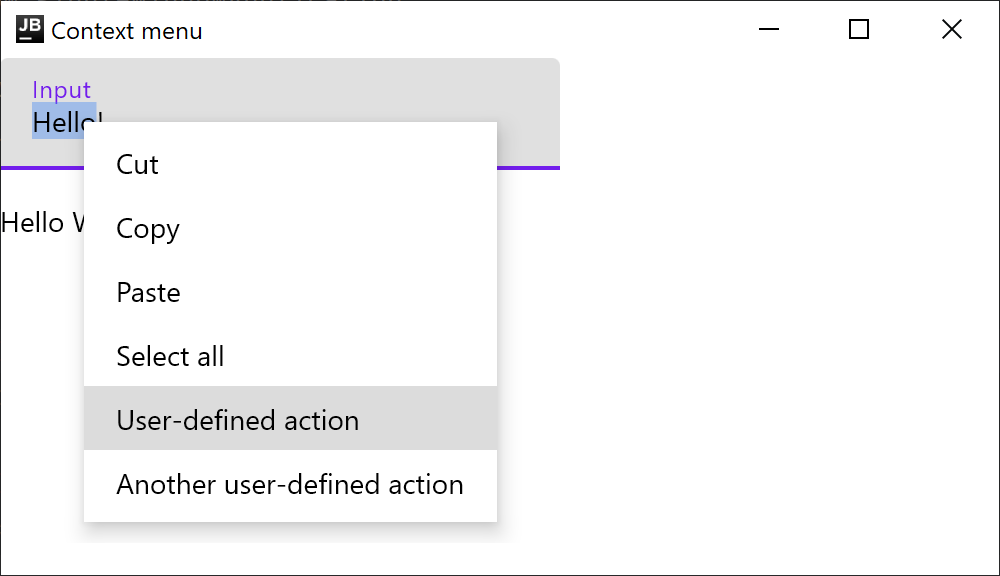
要为 TextField 和 Text 组件添加自定义上下文菜单操作,请通过 ContextMenuItem 指定新项,并通过 ContextMenuDataProvider 将它们添加到上下文菜单项的层次结构中。例如,以下代码示例显示了如何向文本字段和简单的可选择文本元素的默认上下文菜单中添加两个新的自定义操作:
import androidx.compose.foundation.ContextMenuDataProvider
import androidx.compose.foundation.ContextMenuItem
import androidx.compose.foundation.layout.Column
import androidx.compose.foundation.layout.Spacer
import androidx.compose.foundation.layout.height
import androidx.compose.foundation.text.selection.SelectionContainer
import androidx.compose.material.Text
import androidx.compose.material.TextField
import androidx.compose.runtime.mutableStateOf
import androidx.compose.runtime.remember
import androidx.compose.ui.Modifier
import androidx.compose.ui.unit.dp
import androidx.compose.ui.window.singleWindowApplication

fun main() = singleWindowApplication(title = "Context menu") {
    val text = remember { mutableStateOf("Hello!") }
    Column {
        ContextMenuDataProvider(
            items = {
                listOf(
                    ContextMenuItem("User-defined action") {
                        // 自定义操作
                    },
                    ContextMenuItem("Another user-defined action") {
                        // 另一个自定义操作
                    }
                )
            }
        ) {
            TextField(
                value = text.value,
                onValueChange = { text.value = it },
                label = { Text(text = "Input") }
            )

            Spacer(Modifier.height(16.dp))

            SelectionContainer {
                Text("Hello World!")
            }
        }
    }
}
重写默认文本上下文菜单
要重写文本字段和可选择文本元素的默认上下文菜单,请重写 TextContextMenu 接口。在以下代码示例中,我们重用了原始的 TextContextMenu,但在列表底部添加了一个额外的项。新项会根据文本选择进行调整:
import androidx.compose.foundation.ContextMenuDataProvider
import androidx.compose.foundation.ContextMenuItem
import androidx.compose.foundation.ContextMenuState
import androidx.compose.foundation.ExperimentalFoundationApi
import androidx.compose.foundation.layout.Column
import androidx.compose.foundation.text.LocalTextContextMenu
import androidx.compose.foundation.text.TextContextMenu
import androidx.compose.foundation.text.selection.SelectionContainer
import androidx.compose.material.Text
import androidx.compose.material.TextField
import androidx.compose.runtime.Composable
import androidx.compose.runtime.CompositionLocalProvider
import androidx.compose.runtime.getValue
import androidx.compose.runtime.mutableStateOf
import androidx.compose.runtime.remember
import androidx.compose.runtime.setValue
import androidx.compose.ui.platform.LocalUriHandler
import androidx.compose.ui.text.AnnotatedString
import androidx.compose.ui.window.singleWindowApplication
import java.net.URLEncoder
import java.nio.charset.Charset

fun main() = singleWindowApplication(title = "Context menu") {
    CustomTextMenuProvider {
        Column {
            SelectionContainer {
                Text("Hello, Compose!")
            }
            var text by remember { mutableStateOf("") }
            TextField(text, { text = it })
        }
    }
}

@OptIn(ExperimentalFoundationApi::class)
@Composable
fun CustomTextMenuProvider(content: @Composable () -> Unit) {
    val textMenu = LocalTextContextMenu.current
    val uriHandler = LocalUriHandler.current
    CompositionLocalProvider(
        LocalTextContextMenu provides object : TextContextMenu {
            @Composable
            override fun Area(
                textManager: TextContextMenu.TextManager,
                state: ContextMenuState,
                content: @Composable () -> Unit
            ) {
                // 重用原始的 TextContextMenu 并添加一个新项
                ContextMenuDataProvider({
                    val shortText = textManager.selectedText.crop()
                    if (shortText.isNotEmpty()) {
                        val encoded = URLEncoder.encode(shortText, Charset.defaultCharset())
                        listOf(ContextMenuItem("Search $shortText") {
                            uriHandler.openUri("https://google.com/search?q=$encoded")
                        })
                    } else {
                        emptyList()
                    }
                }) {
                    textMenu.Area(textManager, state, content = content)
                }
            }
        },
        content = content
    )
}

private fun AnnotatedString.crop() = if (length <= 5) toString() else "${take(5)}..."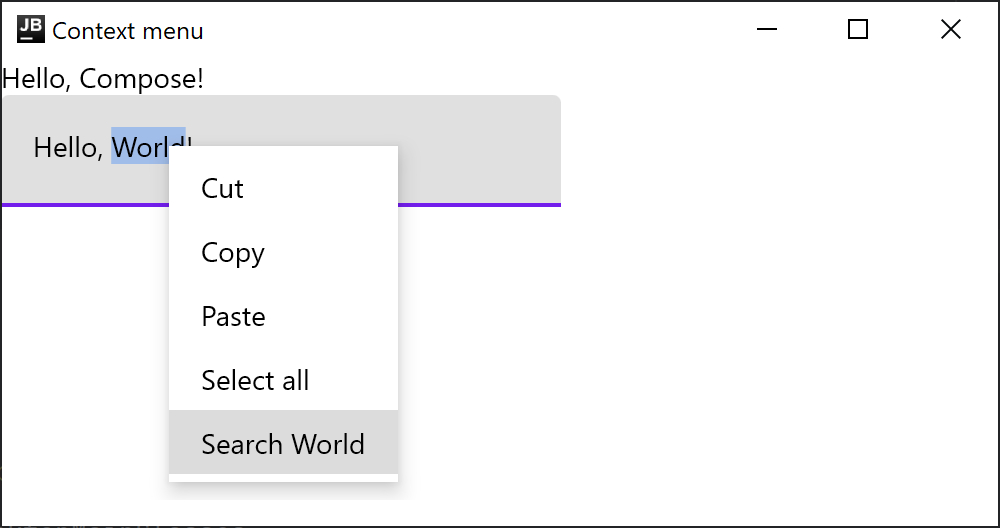
Swing 互操作性
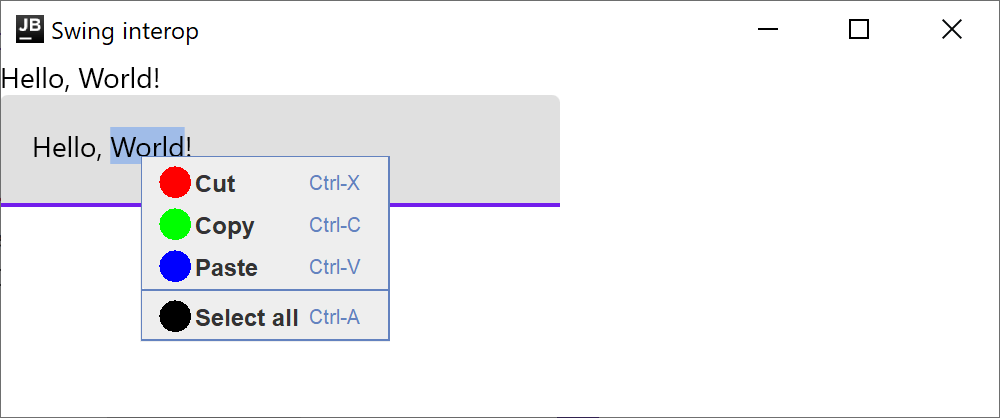
如果你正在将 Compose 代码嵌入到现有的 Swing 应用程序中,并且需要上下文菜单与应用程序其他部分的外观和行为保持一致,可以使用 JPopupTextMenu 类。在此类中,LocalTextContextMenu 对 Compose 组件中的上下文菜单使用 Swing 的 JPopupMenu。
import androidx.compose.foundation.ExperimentalFoundationApi
import androidx.compose.foundation.layout.Column
import androidx.compose.foundation.text.JPopupTextMenu
import androidx.compose.foundation.text.LocalTextContextMenu
import androidx.compose.foundation.text.selection.SelectionContainer
import androidx.compose.material.Text
import androidx.compose.material.TextField
import androidx.compose.runtime.Composable
import androidx.compose.runtime.CompositionLocalProvider
import androidx.compose.runtime.getValue
import androidx.compose.runtime.mutableStateOf
import androidx.compose.runtime.remember
import androidx.compose.runtime.setValue
import androidx.compose.ui.awt.ComposePanel
import androidx.compose.ui.platform.LocalLocalization
import java.awt.Color
import java.awt.Component
import java.awt.Dimension
import java.awt.Graphics
import java.awt.event.KeyEvent
import java.awt.event.KeyEvent.CTRL_DOWN_MASK
import java.awt.event.KeyEvent.META_DOWN_MASK
import javax.swing.Icon
import javax.swing.JFrame
import javax.swing.JMenuItem
import javax.swing.JPopupMenu
import javax.swing.KeyStroke.getKeyStroke
import javax.swing.SwingUtilities
import org.jetbrains.skiko.hostOs

fun main() = SwingUtilities.invokeLater {
    val panel = ComposePanel()
    panel.setContent {
        JPopupTextMenuProvider(panel) {
            Column {
                SelectionContainer {
                    Text("Hello, World!")
                }

                var text by remember { mutableStateOf("") }

                TextField(text, { text = it })
            }
        }
    }

    val window = JFrame()
    window.contentPane.add(panel)
    window.size = Dimension(800, 600)
    window.isVisible = true
    window.title = "Swing interop"
}

@OptIn(ExperimentalFoundationApi::class)
@Composable
fun JPopupTextMenuProvider(owner: Component, content: @Composable () -> Unit) {
    val localization = LocalLocalization.current
    CompositionLocalProvider(
        LocalTextContextMenu provides JPopupTextMenu(owner) { textManager, items ->
            JPopupMenu().apply {
                textManager.cut?.also {
                    add(
                        swingItem(localization.cut, Color.RED, KeyEvent.VK_X, it)
                    )
                }
                textManager.copy?.also {
                    add(
                        swingItem(localization.copy, Color.GREEN, KeyEvent.VK_C, it)
                    )
                }
                textManager.paste?.also {
                    add(
                        swingItem(localization.paste, Color.BLUE, KeyEvent.VK_V, it)
                    )
                }
                textManager.selectAll?.also {
                    add(JPopupMenu.Separator())
                    add(
                        swingItem(localization.selectAll, Color.BLACK, KeyEvent.VK_A, it)
                    )
                }

                // 添加可以通过 ContextMenuDataProvider 在应用程序其他部分定义的项
                for (item in items) {
                    add(
                        JMenuItem(item.label).apply {
                            addActionListener { item.onClick() }
                        }
                    )
                }
            }
        },
        content = content
    )
}

private fun swingItem(
    label: String,
    color: Color,
    key: Int,
    onClick: () -> Unit
) = JMenuItem(label).apply {
    icon = circleIcon(color)
    accelerator = getKeyStroke(key, if (hostOs.isMacOS) META_DOWN_MASK else CTRL_DOWN_MASK)
    addActionListener { onClick() }
}

private fun circleIcon(color: Color) = object : Icon {
    override fun paintIcon(c: Component?, g: Graphics, x: Int, y: Int) {
        g.create().apply {
            this.color = color
            translate(8, 2)
            fillOval(0, 0, 16, 16)
        }
    }

    override fun getIconWidth() = 16

    override fun getIconHeight() = 16
}
下一步
探索关于 其他桌面组件 的教程。