
预定义代理策略
为了简化代理实现,Koog 为常见的代理用例提供了预定义的代理策略。 目前提供以下预定义策略:
聊天代理策略
聊天代理策略(Chat agent strategy)旨在执行聊天交互流程。 它协调不同阶段、节点和工具之间的交互,以类聊天的方式处理用户输入、执行工具并提供响应。
概览
聊天代理策略实现了一种模式,在此模式下代理执行以下操作:
- 接收用户输入
- 使用 LLM 处理输入
- 调用工具或提供直接响应
- 处理工具结果并继续对话
- 如果 LLM 尝试以纯文本形式响应而非使用工具,则提供反馈
这种方法创建了一个对话式界面,代理可以使用工具来满足用户请求。
设置与依赖项
Koog 中聊天代理策略的实现是通过 chatAgentStrategy 函数完成的。要使该函数在您的代理代码中可用,请添加以下依赖项导入:
ai.koog.agents.ext.agent.chatAgentStrategy要使用该策略,请按照以下模式创建一个 AI 代理:
=== "Kotlin"
<!--- INCLUDE
import ai.koog.agents.core.agent.AIAgent
import ai.koog.prompt.executor.llms.all.simpleOpenAIExecutor
import ai.koog.agents.ext.agent.chatAgentStrategy
import ai.koog.agents.core.tools.ToolRegistry
import ai.koog.prompt.executor.clients.openai.OpenAIModels

val apiKey = System.getenv("OPENAI_API_KEY") ?: error("Please set OPENAI_API_KEY environment variable")
val promptExecutor =simpleOpenAIExecutor(apiKey)
val toolRegistry = ToolRegistry.EMPTY
val model =  OpenAIModels.Chat.O4Mini
-->
```kotlin
val chatAgent = AIAgent(
    promptExecutor = promptExecutor,
    toolRegistry = toolRegistry,
    llmModel = model,
    // 将 chatAgentStrategy 设置为代理策略
    strategy = chatAgentStrategy()
)
```
<!--- KNIT example-predefined-strategies-01.kt -->
=== "Java"
<!--- INCLUDE
import ai.koog.agents.core.agent.AIAgent;
import ai.koog.agents.core.tools.ToolRegistry;
import ai.koog.prompt.executor.clients.openai.OpenAIModels;
import ai.koog.prompt.executor.model.PromptExecutor;
import ai.koog.agents.ext.agent.AIAgentStrategies;
class examplePredefinedStrategiesJava01 {
    public static void main(String[] args) {
-->
<!--- SUFFIX
    }
}
-->
```java
AIAgent<String, String> chatAgent = AIAgent.builder()
    .promptExecutor(PromptExecutor.builder().openAI("OPENAI_API_KEY").build())
    .llmModel(OpenAIModels.Chat.O4Mini)
    .toolRegistry(ToolRegistry.builder().build())
    // 将 chatAgentStrategy 设置为代理策略
    .graphStrategy(AIAgentStrategies.chatAgentStrategy())
    .build();
```
<!--- KNIT examplePredefinedStrategiesJava01.java -->
何时使用聊天代理策略
聊天代理策略特别适用于:
- 构建需要使用工具的对话式代理
- 创建能够根据用户请求执行操作的助手
- 实现需要访问外部系统或数据的聊天机器人
- 想要强制使用工具而非纯文本响应的场景
示例
以下是一个实现预定义聊天代理策略 (chatAgentStrategy) 以及代理可能使用的工具的 AI 代理代码示例:
=== "Kotlin"
<!--- INCLUDE
import ai.koog.agents.core.agent.AIAgent
import ai.koog.prompt.executor.llms.all.simpleOpenAIExecutor
import ai.koog.agents.ext.agent.chatAgentStrategy
import ai.koog.agents.core.tools.ToolRegistry
import ai.koog.prompt.executor.clients.openai.OpenAIModels
import ai.koog.agents.ext.tool.AskUser
import ai.koog.agents.ext.tool.SayToUser

typealias searchTool = AskUser
typealias weatherTool = SayToUser

val apiKey = System.getenv("OPENAI_API_KEY") ?: error("Please set OPENAI_API_KEY environment variable")
val promptExecutor =simpleOpenAIExecutor(apiKey)
val toolRegistry = ToolRegistry.EMPTY
val model =  OpenAIModels.Chat.O4Mini
-->
```kotlin
val chatAgent = AIAgent(
    promptExecutor = promptExecutor,
    llmModel = model,
    // 使用 chatAgentStrategy 作为代理策略
    strategy = chatAgentStrategy(),
    // 添加代理可以使用的工具
    toolRegistry = ToolRegistry {
        tool(searchTool)
        tool(weatherTool)
    }
)

suspend fun main() {
    // 使用用户查询运行代理
    val result = chatAgent.run("今天天气怎么样,我应该带伞吗?")
}
```
<!--- KNIT example-predefined-strategies-02.kt -->
=== "Java"
<!--- INCLUDE
import ai.koog.agents.core.agent.AIAgent;
import ai.koog.agents.core.tools.ToolRegistry;
import ai.koog.agents.core.tools.reflect.ToolSet;
import ai.koog.agents.core.tools.annotations.Tool;
import ai.koog.agents.core.tools.annotations.LLMDescription;
import ai.koog.prompt.executor.clients.openai.OpenAIModels;
import ai.koog.prompt.executor.model.PromptExecutor;
import ai.koog.agents.ext.agent.AIAgentStrategies;
class examplePredefinedStrategiesJava02 {
    static class SearchAndWeatherTools implements ToolSet {
        @Tool
        @LLMDescription("搜索信息")
        public String search(@LLMDescription("搜索查询") String query) {
            return "搜索结果: " + query;
        }
        @Tool
        @LLMDescription("获取天气信息")
        public String weather(@LLMDescription("地点") String location) {
            return location + "的天气: 晴朗";
        }
    }
    public static void main(String[] args) {
-->
<!--- SUFFIX
    }
}
-->
```java
// 添加代理可以使用的工具
ToolRegistry toolRegistry = ToolRegistry.builder()
    .tools(new SearchAndWeatherTools())
    .build();

AIAgent<String, String> chatAgent = AIAgent.builder()
    .promptExecutor(PromptExecutor.builder().openAI("OPENAI_API_KEY").build())
    .llmModel(OpenAIModels.Chat.O4Mini)
    // 使用 chatAgentStrategy 作为代理策略
    .graphStrategy(AIAgentStrategies.chatAgentStrategy())
    .toolRegistry(toolRegistry)
    .build();

// 使用用户查询运行代理
String result = chatAgent.run("今天天气怎么样,我应该带伞吗?");
```
<!--- KNIT examplePredefinedStrategiesJava02.java -->
ReAct 策略
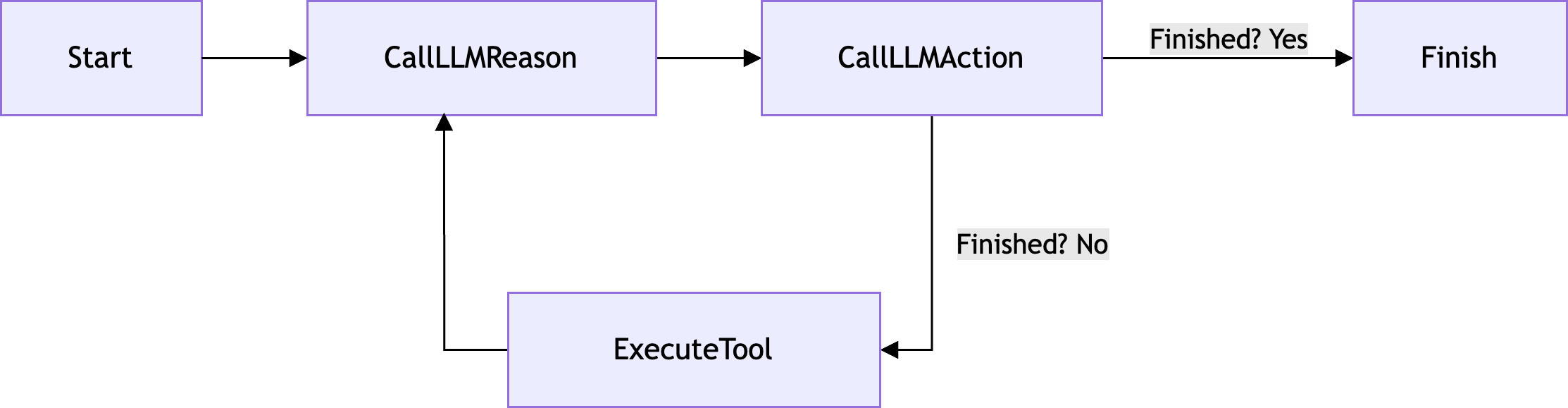
ReAct (Reasoning and Acting) 策略是一种 AI 代理策略,它在推理和执行阶段之间交替,以动态处理任务并请求大语言模型 (LLM) 的输出。
概览
ReAct 策略实现了一种模式,在此模式下代理执行以下操作:
- 对当前状态进行推理并规划后续步骤
- 基于该推理采取行动
- 观察这些行动的结果
- 重复此循环
这种方法结合了推理(逐步思考问题)和行动(执行工具以收集信息或执行操作)的优势。
流程图
以下是 ReAct 策略的流程图:
设置与依赖项
Koog 中 ReAct 策略的实现是通过 reActStrategy 函数完成的。
要使用该策略,请按照以下模式创建一个 AI 代理:
=== "Kotlin"
<!--- INCLUDE
import ai.koog.agents.core.agent.AIAgent
import ai.koog.prompt.executor.llms.all.simpleOpenAIExecutor
import ai.koog.agents.ext.agent.reActStrategy
import ai.koog.agents.core.tools.ToolRegistry
import ai.koog.prompt.executor.clients.openai.OpenAIModels

val apiKey = System.getenv("OPENAI_API_KEY") ?: error("Please set OPENAI_API_KEY environment variable")
val promptExecutor = simpleOpenAIExecutor(apiKey)
val toolRegistry = ToolRegistry.EMPTY
val model =  OpenAIModels.Chat.O4Mini
-->
```kotlin {5-10}
val reActAgent = AIAgent(
    promptExecutor = promptExecutor,
    toolRegistry = toolRegistry,
    llmModel = model,
    // 将 reActStrategy 设置为代理策略
    strategy = reActStrategy(
        // 设置可选形参值
        reasoningInterval = 1,
        name = "react_agent"
    )
)
```
<!--- KNIT example-predefined-strategies-03.kt -->
=== "Java"
<!--- INCLUDE
import ai.koog.agents.core.agent.AIAgent;
import ai.koog.agents.core.tools.ToolRegistry;
import ai.koog.prompt.executor.clients.openai.OpenAIModels;
import ai.koog.prompt.executor.model.PromptExecutor;
import ai.koog.agents.ext.agent.AIAgentStrategies;
class examplePredefinedStrategiesJava03 {
    public static void main(String[] args) {
-->
<!--- SUFFIX
    }
}
-->
```java
AIAgent<String, String> reActAgent = AIAgent.builder()
    .promptExecutor(PromptExecutor.builder().openAI("OPENAI_API_KEY").build())
    .llmModel(OpenAIModels.Chat.O4Mini)
    .toolRegistry(ToolRegistry.builder().build())
    // 将 reActStrategy 设置为代理策略
    .graphStrategy(AIAgentStrategies.reActStrategy(
        // 设置可选形参值
        1, // reasoningInterval
        "react_agent" // name
    ))
    .build();
```
形参
reActStrategy 函数接受以下形参:
| 形参 | 类型 | 默认值 | 描述 |
|---|---|---|---|
reasoningInterval | Int | 1 | 指定推理步骤的间隔。必须大于 0。 |
name | String | re_act | 策略的名称。 |
示例用例
以下是 ReAct 策略如何与简单的银行代理配合工作的示例:
1. 用户输入
用户发送初始提示词。例如,这可以是一个问题,如 How much did I spend last month?(上个月我花了多少钱?)。
2. 推理
代理通过获取用户输入和推理提示词来执行初始推理。推理过程可能如下所示:
我需要遵循以下步骤:
1. 获取上个月的所有交易记录
2. 过滤掉存款(正数金额)
3. 计算总支出
3. 行动与执行,第一阶段
根据代理在上一步中定义的行动项,它运行一个工具来获取上个月的所有交易记录。
在这种情况下,要运行的工具是 get_transactions,并带有定义的 startDate 和 endDate 实参,这些实参匹配获取上个月所有交易的请求:
{tool: "get_transactions", args: {startDate: "2025-05-19", endDate: "2025-06-18"}}该工具返回的结果可能如下所示:
[
  {date: "2025-05-25", amount: -100.00, description: "Grocery Store"},
  {date: "2025-05-31", amount: +1000.00, description: "Salary Deposit"},
  {date: "2025-06-10", amount: -500.00, description: "Rent Payment"},
  {date: "2025-06-13", amount: -200.00, description: "Utilities"}
]
4. 推理
利用工具返回的结果,代理再次进行推理,以确定其流程中的后续步骤:
我已经拿到了交易记录。现在我需要:
1. 移除 +1000.00 的工资存款
2. 对剩余交易进行求和
5. 行动与执行,第二阶段
根据之前的推理步骤,代理调用 calculate_sum 工具,该工具对作为工具实参提供的金额进行求和。由于推理还产生了从交易中移除正数金额的行动点,因此作为工具实参提供的金额仅为负数金额:
{tool: "calculate_sum", args: {amounts: [-100.00, -500.00, -200.00]}}工具返回最终结果:
-800.006. 最终响应
代理返回包含计算出的总和的最终响应(助手消息):
您上个月在杂货、房租和公用事业上花费了 800.00 美元。何时使用 ReAct 策略
ReAct 策略特别适用于:
- 需要多步推理的复杂任务
- 代理需要在提供最终答案之前收集信息的场景
- 适合分解为更小步骤的问题
- 同时需要分析性思维和工具使用的任务
示例
以下是一个实现预定义 ReAct 策略 (reActStrategy) 以及代理可能使用的工具的 AI 代理代码示例:
=== "Kotlin"
<!--- INCLUDE
import ai.koog.agents.core.agent.AIAgent
import ai.koog.prompt.executor.llms.all.simpleOpenAIExecutor
import ai.koog.agents.ext.agent.reActStrategy
import ai.koog.agents.core.tools.ToolRegistry
import ai.koog.prompt.executor.clients.openai.OpenAIModels
import ai.koog.agents.ext.tool.AskUser
import ai.koog.agents.ext.tool.SayToUser

typealias Input = String

typealias getTransactions = AskUser
typealias calculateSum = SayToUser

val apiKey = System.getenv("OPENAI_API_KEY") ?: error("Please set OPENAI_API_KEY environment variable")
val promptExecutor = simpleOpenAIExecutor(apiKey)
val toolRegistry = ToolRegistry.EMPTY
val model =  OpenAIModels.Chat.O4Mini
-->
```kotlin
val bankingAgent = AIAgent(
    promptExecutor = promptExecutor,
    llmModel = model,
    // 使用 reActStrategy 作为代理策略
    strategy = reActStrategy(
        reasoningInterval = 1,
        name = "banking_agent"
    ),
    // 添加代理可以使用的工具
    toolRegistry = ToolRegistry {
        tool(getTransactions)
        tool(calculateSum)
    }
)

suspend fun main() {
    // 使用用户查询运行代理
    val result = bankingAgent.run("上个月我花了多少钱?")
}
```
<!--- KNIT example-predefined-strategies-04.kt -->
=== "Java"
<!--- INCLUDE
import ai.koog.agents.core.agent.AIAgent;
import ai.koog.agents.core.tools.ToolRegistry;
import ai.koog.agents.core.tools.reflect.ToolSet;
import ai.koog.agents.core.tools.annotations.Tool;
import ai.koog.agents.core.tools.annotations.LLMDescription;
import ai.koog.prompt.executor.clients.openai.OpenAIModels;
import ai.koog.prompt.executor.model.PromptExecutor;
import ai.koog.agents.ext.agent.AIAgentStrategies;
class examplePredefinedStrategiesJava04 {
    static class BankingTools implements ToolSet {
        @Tool
        @LLMDescription("获取日期范围内的交易记录")
        public String getTransactions(
            @LLMDescription("开始日期") String startDate,
            @LLMDescription("结束日期") String endDate
        ) {
            return "[{amount: -100.00}, {amount: +1000.00}, {amount: -500.00}]";
        }
        @Tool
        @LLMDescription("计算金额总和")
        public String calculateSum(@LLMDescription("待求和的金额") String amounts) {
            return "-800.00";
        }
    }
    public static void main(String[] args) {
-->
<!--- SUFFIX
    }
}
-->
```java
// 添加代理可以使用的工具
ToolRegistry toolRegistry = ToolRegistry.builder()
    .tools(new BankingTools())
    .build();

AIAgent<String, String> bankingAgent = AIAgent.<String, String>builder()
    .promptExecutor(PromptExecutor.builder().openAI("OPENAI_API_KEY").build())
    .llmModel(OpenAIModels.Chat.O4Mini)
    // 使用 reActStrategy 作为代理策略
    .graphStrategy(AIAgentStrategies.reActStrategy(1, "banking_agent"))
    .toolRegistry(toolRegistry)
    .build();

// 使用用户查询运行代理
String result = bankingAgent.run("上个月我花了多少钱?");
```
<!--- KNIT examplePredefinedStrategiesJava03.java -->